Learn Unity Roadmap: What's New for Developers
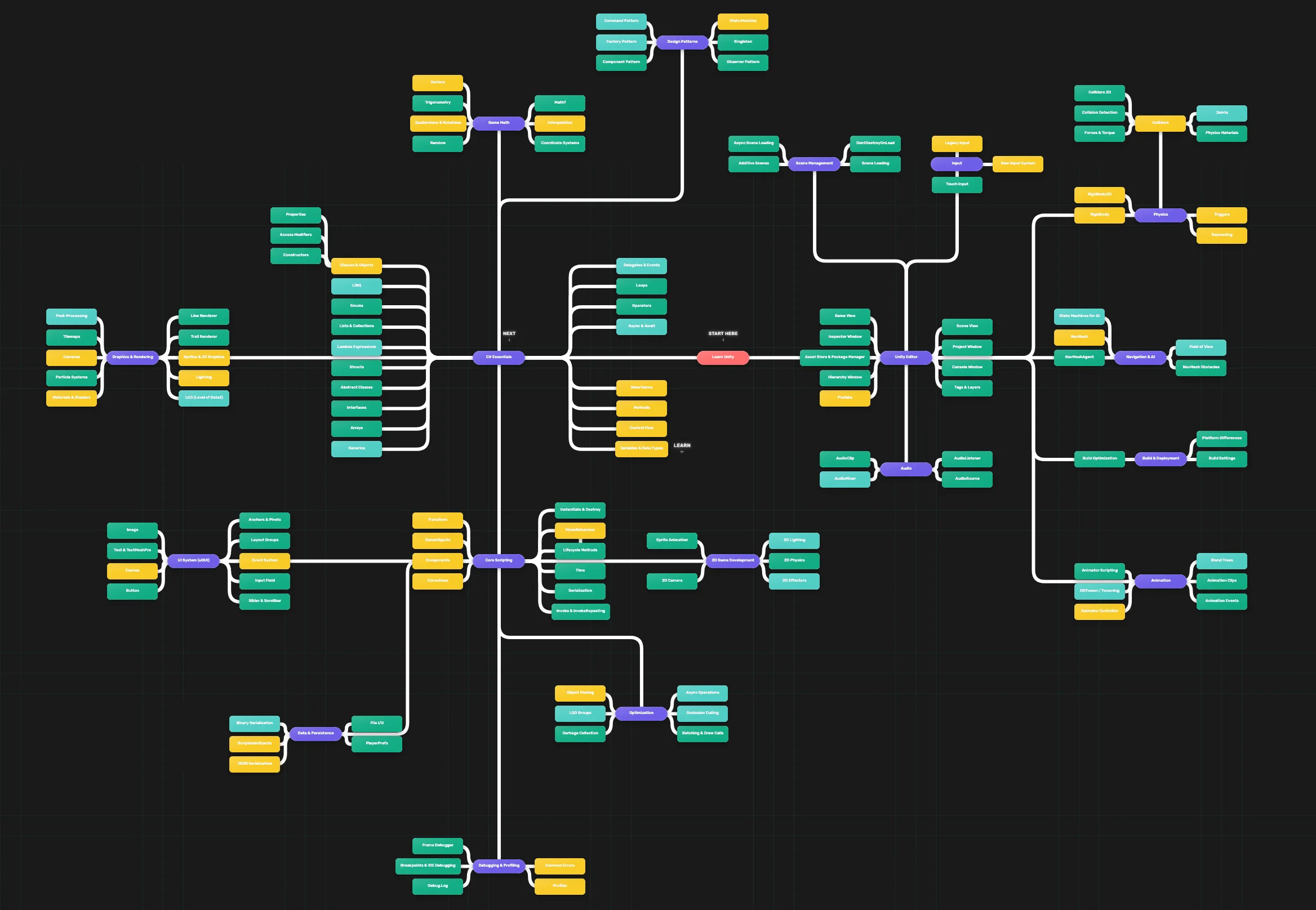
TL;DR: The Learn Unity Roadmap is now the main public learning path at darkounity.com, covering C# basics through Unity scripting, physics, and UI. Recent updates add stacking for multiple topics, examples, and exercises per node, tabbed About/Examples/Exercises panels, progress pills, a BETA 1.0 badge, and full Open Graph plus Twitter Card meta for cleaner sharing.
Learn Unity Roadmap: What's New for Developers
The Learn Unity Roadmap is a free, interactive learning path that takes you from C# basics through Unity scripting, physics, UI, and more. Here’s what changed recently from a dev and product perspective.
A Dedicated Learn Unity Roadmap
The main public roadmap is now Learn Unity (ID: roadmap_learn-unity-1773209660064). All links from the homepage hero and the nav dropdown point to this roadmap. It’s built as a single root node (“Learn Unity”) with major categories (C# Essentials, Unity Editor, Core Scripting, etc.) and a clear progression: learn first, then go deeper. The structure is documented in a node plan with color-coded tiers (root, major category, sub-category, standard, advanced) so both admins and learners can follow the flow.
Stacking: Multiple Topics, Examples, and Exercises per Node
Previously, each node had at most one topic, one example, and one exercise. Stacking is now supported: you can attach multiple topics, examples, or exercises to the same node and control their order. In the roadmap admin, items are numbered (1, 2, 3…) and reorderable with up/down. In the viewer, learners see “Topic 1”, “Exercise 1”, “Exercise 2”, and so on. This lets you break a big concept into several steps or add extra practice without creating many small nodes.
Viewer and UX Updates
Section tabs. The right-hand panel uses plain tabs (About, Examples, Exercises) so learners can switch between theory, code, and tasks without scrolling one long page.
Progress and pills. Nodes show counts for completed vs total topics, examples, and exercises (e.g. 0/1, 0/3). The color legend was updated (e.g. coral for emphasis, teal for standard nodes) and there’s an option for text color on light backgrounds so labels stay readable.
BETA 1.0. The roadmap viewer shows a small “BETA 1.0” badge so visitors know the experience is still being refined.
SEO and sharing. The roadmap-view page has full Open Graph and Twitter Card meta (title, description, image). When you share the Learn Unity link on Facebook, X, LinkedIn, or Reddit, the preview uses a dedicated title, short description, and the roadmap-program image so it looks consistent and on-brand.
Dynamic title and meta. When a specific roadmap is loaded, the document title and meta description can update per roadmap for better SEO when people land on a deep link.
Under the Hood
Layout and performance. The Learn Unity roadmap uses a flat layout by color tier and a tree-style hierarchy so categories and “learn first / learn second” sections are clear. Viewport culling keeps only visible nodes and edges in the render loop for smoother pan and zoom on large maps.
Sync and deploy. Roadmap content can be synced to production from the admin (with a local-only option and progress feedback). The sitemap and canonical URLs are set so the main roadmap-view URL and the Learn Unity link are indexed correctly.
Try It
Open the roadmap here: Learn Unity Roadmap. Use “Drag to pan”, “Scroll to zoom”, and “Click node to select” to move through the graph. The right panel shows the current node’s about text, examples, and exercises. If you’re building your own learning path or tools, the stacking model and the public API for roadmaps might be useful reference.
Other topics
Cities Skylines 2 failed because of Unity? Is this true? I investigated! Read More
