Darko Unity LLM Intelligence Benchmark Test DULLMIBT
A seven layer benchmark where an LLM agent builds a complete procedural 3D landscape inside the Unity Editor. Terrain, splat maps, water, props, lighting, clouds, and a horizon ring. Each layer earns a score you can compare across models and runs.
What is DULLMIBT?
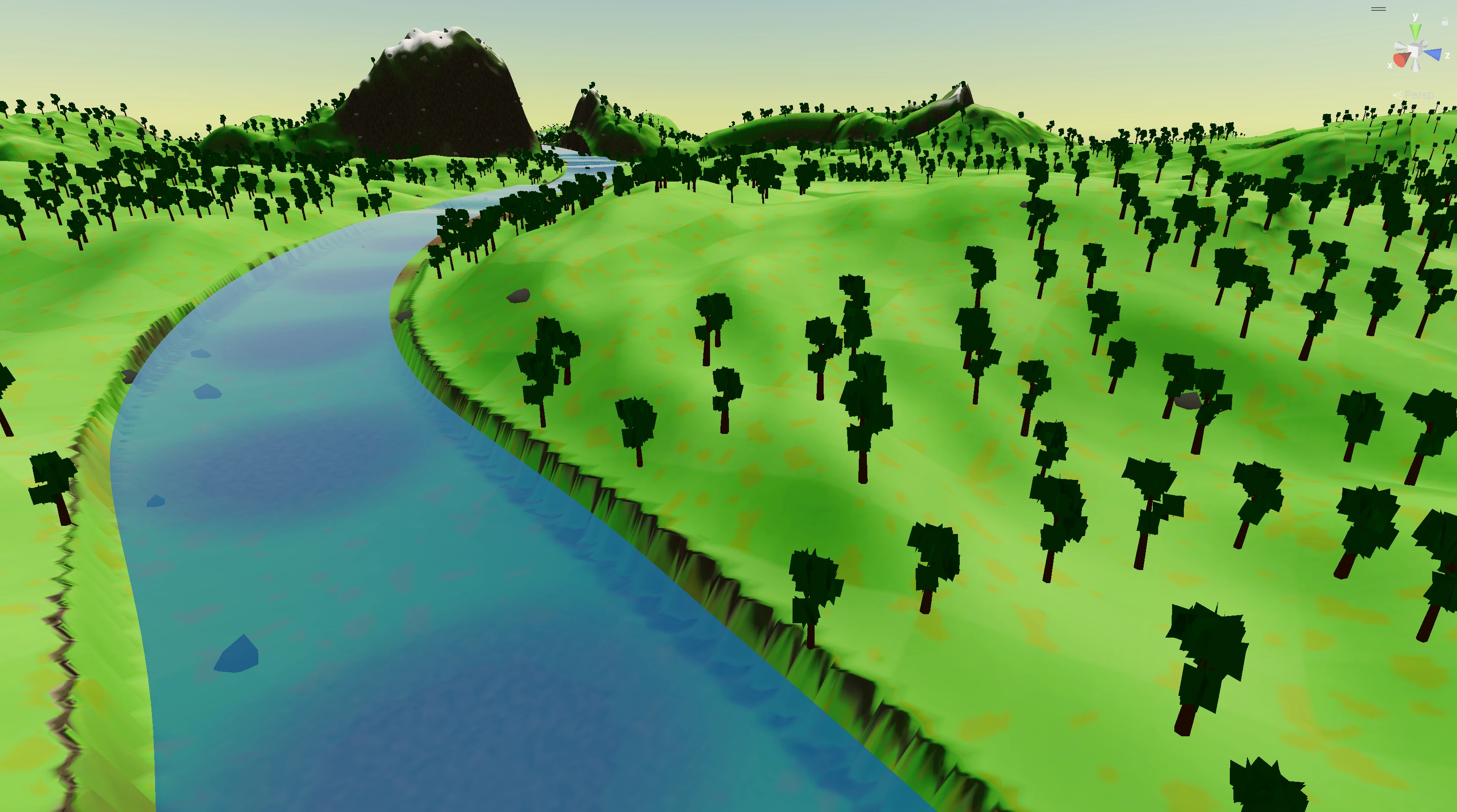
The Darko Unity LLM Intelligence Benchmark Test (DULLMIBT) asks an LLM agent to build a complete procedural 3D landscape inside the Unity Editor across seven ordered layers. The agent starts from an empty scene and ends with terrain, materials, water, vegetation, lighting, sky, and a horizon ring. Every layer only adds to the scene. Nothing is allowed to modify what an earlier layer produced. Each layer is scored out of 100, for a 700 point total that stays comparable across models and runs.
Why benchmark LLMs on Unity?
I built DULLMIBT because every general LLM benchmark I looked at scored chat answers, not engine work. Large language models are going to matter more in game and real time 3D work, and I wanted a number I could trust when I picked a model to drive Unity. So this one scores what actually lands in the editor. Scene structure, hierarchy, setup that has to hold up inside a real project. Use it when you want comparable numbers on Unity capability across models, versions, or prompt strategies, and when the outcome you care about is the scene, not the reply.
The seven layers
A run executes all seven layers in order, without stopping between
them. Each run is isolated under
Assets/BenchmarkRuns/{run-id}/ and every layer only
adds to the scene. Layer 3 cannot rewrite Layer 1's terrain. Layer
4 cannot move Layer 3's water. That isolation is the rule the
rubric is built on.
| # | Layer | What the agent builds |
|---|---|---|
| 1 | Terrain & surface PBR | Custom mesh terrain with mountains, hills, plains, and a meandering river valley. Domain-warped continental noise picks zones, and baked tint, height, and normal maps land on a URP material. |
| 2 | Splat mapping | RGBA splat map (grass / rock / dirt / snow) plus tileable procedural PBR texture sets, composited into the terrain material with sun-exposure tinting. |
| 3 | Water system | A continuous river surface that follows the carved channel and extends off the map edges, plus optional lakes and ponds on larger maps. Records water exclusion zones. |
| 4 | Props | Recursive procedural trees with bark and cross-billboard leaves, plus scattered rocks. Each one unique seeded, placed via downward raycast, with density noise and water exclusion respected. |
| 5 | Lighting & post-processing | Directional sun, gradient ambient, procedural skybox, and a Global Volume with ACES tonemapping, bloom, color grading, vignette, and SSAO. |
| 6 | Sky & clouds | Cluster of spheres clouds floating at least 120 m above the highest terrain point. Cumulus, wisp, and puff variants, with shadow casting disabled. |
| 7 | Horizon closure | A continuous mountain ring outside the playable terrain that welds to the terrain edges, hides the void, and gets a smaller ring forest of its own. |
Layers are scored independently, so a partial run still produces meaningful numbers. An agent that nails Layers 1 through 4 but stalls at lighting still has four layer scores you can line up against another model's four.
How to use
The benchmark ships as text you copy once and paste into your LLM tool, so every run sees the same instructions and constraints.
You need the full benchmark text in the model context. Click
Copy for your LLM to pull the latest START-BENCHMARK.md
straight from the repo and drop it on your clipboard. Paste it
into Claude Code, Cursor, ChatGPT, your own API stack, or any
tool that accepts a large first message or system block. That
way layers, wording, and scoring assumptions stay identical
between runs and between people.
Before you click Copy, set the Unity side up. Any modern Unity
version with the Universal Render Pipeline, an empty scene as
your starting point, and a Unity MCP server exposing an
execute_code tool (strongly recommended). I built
the benchmark around runtime editor manipulation through MCP.
Without MCP it falls back to writing C# Editor scripts under
the run folder that you trigger via [MenuItem]
entries.
Everything that counts must be procedurally generated by the
agent itself. Nothing is treated as if you dropped it into the
editor by hand beforehand. Each run lives in its own folder
(Assets/BenchmarkRuns/{agent}-{date}/), so multiple
agents can share the same project without stepping on each
other.
How to contribute
I want DULLMIBT to grow in public. The GitHub card above points at the repository that holds task definitions, helper scripts, and documentation.
Open an issue for new layer ideas, unclear task wording,
scoring edge cases, or Unity version notes. Pull requests are
welcome for tasks, fixtures, docs, and tooling. See
CONTRIBUTING.md in the repo for branch names and
review expectations.
If you publish scores or comparisons, tie them to a benchmark revision and a short methodology note so others can reproduce your runs. Same habit as any serious eval.
Scoring the benchmark
Each layer is scored out of 100 points across structural, technical, and visual criteria. Seven layers, 700 points total. Layer 1 (terrain) carries an additional map size multiplier (0.5× to 1.3×) so larger, more densely featured worlds are rewarded. Smaller maps are not penalized for being smaller, only for being thinner.
To keep results comparable, log the same facts every time. Benchmark revision, LLM model id and any temperature or API settings, whether Unity MCP was active or you ran in script fallback mode, Unity version, and platform. If you change the prompt, editor layout, or packages mid run, start a new scored attempt.
| Scope | What it covers |
|---|---|
| Per layer | Each layer ships with its own rubric in START-BENCHMARK.md. Layer 1 weights structure heavily (zone differentiation, river quality). Layer 5 weights post processing setup. Layer 4 weights placement quality on the props themselves. |
| Per run | The sum of all seven layer scores. A clean run scoring 9 to 10 on every criterion means the agent met every requirement, the scene is reproducible, and there are no compile errors or floating objects. |
| Across models | Only compare runs that share the same benchmark revision, Unity minor version band, execution mode (MCP or script-fallback), and scoring sheet version. |
Automated checks (scene queries, edit tests, CI) may ship later.
Until then, human review against the rubric in
START-BENCHMARK.md stays the baseline.