A roadmap for new unity developers
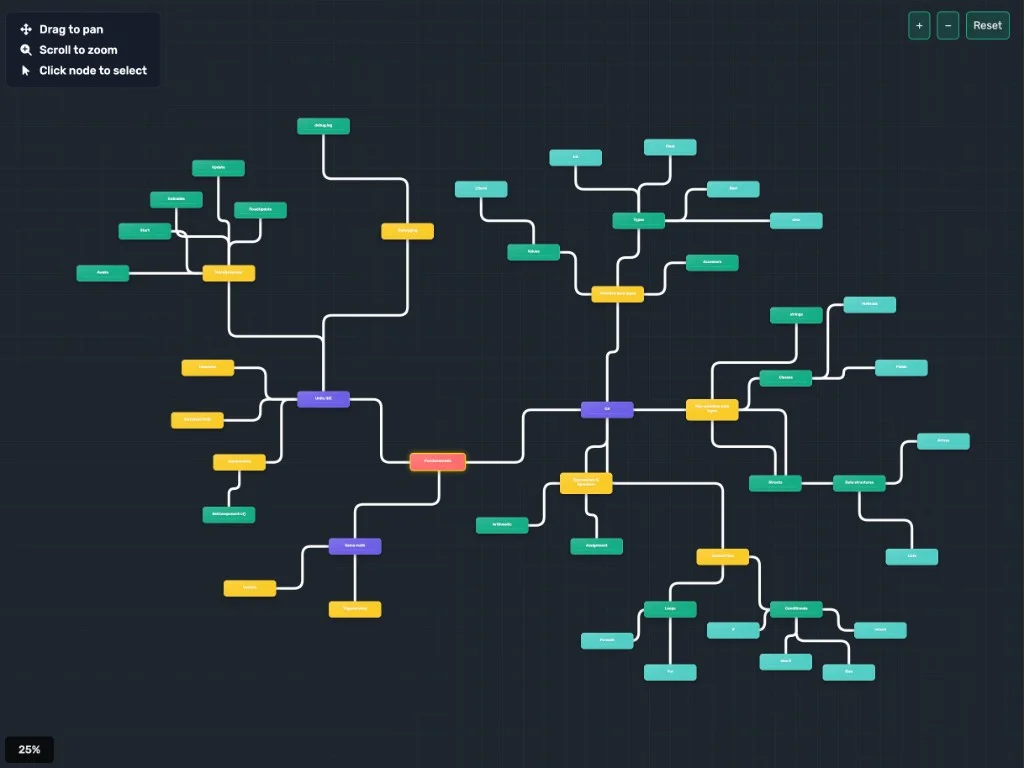
TL;DR: I built an interactive roadmap for new Unity developers because tutorials teach you how to move a character but never show the full map. It is a skill tree covering C# fundamentals, MonoBehaviour lifecycle, components, game math, and debugging. Click any node to see context. It lives on my site as part of the Fundamentals Program.
A roadmap for new unity developers
Starting out in Unity can feel overwhelming. There are countless tutorials, courses, and resources, but few of them show you the full picture. You might learn how to move a character or spawn bullets, but do you understand why the code works? Do you know what to learn next? I spent years copy-pasting without that why and paid for it later (see 10 mistakes I made learning Unity alone).
I built an interactive roadmap to solve this problem. It maps out the essential concepts for new Unity developers, from C# fundamentals to Unity-specific patterns, so you can see the big picture and follow a clear learning path.
What the Roadmap Covers
The roadmap is organized as an interactive skill tree. Each node represents a concept, and the connections show how topics relate and build on each other.
C# fundamentals form the core. You will find variables and data types (int, float, bool, string), control flow (conditionals, loops), methods, classes, structs, and data structures. These are the building blocks you need before diving into Unity-specific code.
Unity concepts branch from there. MonoBehaviour lifecycle methods (Awake, Start, Update, FixedUpdate) are central to how Unity runs your game. Components, GetComponent, and the Unity API connect your C# knowledge to the engine. The roadmap also touches on Unity ECS for those curious about more advanced architecture.
Game math and debugging round out the picture. Mathf, Debug.log, and related utilities help you work effectively in the engine. Knowing what each piece is comes first, but using them well is the next step, which is exactly what 10 essential tips every Unity developer must know is about.
How to Use It
The roadmap is interactive. You can drag to pan, scroll to zoom, and click any node to see its content in detail. Each node includes explanations and context so you understand not just what something is, but when and why you would use it.
If you are new to Unity, start at the C# fundamentals and work your way through the connections. For the full 2026 take on this order, including where AI fits in, see how to actually learn Unity in 2026 in the age of AI. If you already know some C# but feel lost in Unity, jump to the MonoBehaviour and Components sections. The structure lets you see dependencies at a glance, so you always know what to learn next.
Where to Find It
The roadmap lives on my site as part of the Fundamentals Program. You can access it directly and explore at your own pace. It is designed to complement my mentorship program, but it is useful on its own as a reference and learning guide.
Whether you are learning independently or working with a mentor, having a clear map of the territory makes a huge difference. Instead of bouncing between random tutorials, you can follow a logical path and build real understanding.
