How to Actually Learn Unity in 2026 in the Age of AI

Part of Unity AI, my index of AI in Unity coverage.
TL;DR: How to learn Unity in 2026 without falling into AI tutorial hell. Focus on C# fundamentals (primitives, conditionals, methods, classes) before Unity-specific APIs. Start with a small Ping Pong project. Use AI as a chat tutor, not a code writer. Combine YouTube, Udemy, and the free Learn Unity Roadmap. Practice consistently so AI becomes an asset instead of a crutch.
Introduction
Back in 2015, learning Unity meant staring at broken code for three days until something clicked. Tutorials were worse then. You asked on Stack Overflow and got no replies. If you got stuck, you got stuck. But you also learned, exactly because you could get stuck. In 2026, you don't learn, you prompt. Claude writes the code, ChatGPT explains the concept, and you never even learn bugs are a thing. AI is the new tutorial hell. Maybe worse. But it's also the fastest way to learn, if you don't let it do your thinking. Here's how to get both.
Table of Contents
- What should I learn first in Unity?
- How big should your first Unity project be?
- Where do you learn Unity in 2026?
- Should beginners use AI while learning Unity?
- Do you still need to learn C# if AI writes the code?
- What should every Unity beginner know?
- Is AI the new tutorial hell?
- Is Unity hard to learn for beginners?
- Learn Unity, embrace AI
What should I learn first in Unity?
Focus more on C# than on Unity itself. Unity is easy. A few days to learn the essentials: open and save a scene, drag GameObjects in, use the Inspector and Hierarchy, create a Prefab, attach a component. That's it. Unity is a tool. C# is the thinking. Spend your real effort on code and on building a small project from day one. A question I get a lot is whether that means grinding C# in isolation before opening Unity. It does not, and I explain why in Why "Learn C# First" Is Bad Advice for Unity Beginners.
The way I prefer it, and how I go through it with my students: after installing Unity, we start building a "real" project right away. We build a simple Ping Pong game in the first week. You learn everything you need about the Unity Editor by using it.
How big should your first Unity project be?
You've probably read this advice before and it is very true. Start small is legit advice. When you build a smaller project, you train yourself to finish things, which is a skill in itself in game development. When you finish a small project, you will begin to understand how Unity is structured, and you will not be stuck on minor Editor stuff. My rule: if you can't finish it in a week, it's too big.
But nobody defines small. I had this issue working with my students where they suggested which first games we should build together. The issue was: they suggested games that looked small compared to GTA 6, but the games themselves were not small. That's what most beginners don't catch yet. You have not built enough projects to know what is big and what is small. An NES Super Mario game looks like a small game. 2D, sprite assets, 8-bit. But in reality, even for an experienced dev, such a game could take months to finish. A core mechanic would take a few hours or a few minutes with today's AI, but you get the idea. Not every game is small, even though it looks like it.
That is why I always recommend the Ping Pong project as your first. Here is a list of smaller projects a beginner can complete:
- Ping Pong
- Flappy Bird
- Space Invaders
Take Tetris, for example. It looks like a small, simple game, but it actually requires real experience to make it. You must know some algorithms, some data structures, some math, events, and more.
Where do you learn Unity in 2026?
AI is amazing, even though many will not agree with that.
YouTube tutorials
I still suggest YouTube videos, and there is a reason for it. AI can answer all your questions instantly, but when you talk to AI, you are actually taking something away from humanity. Even if you use AI, and I can't stop you from using it, supplement everything with YouTube. It teaches you how other programmers think, and you also get to see how a real human being behaves and how they look. Of course I am joking on that last part, but I am of the opinion that people are isolating themselves with these chatbots more and more, and social interaction is becoming minimal. So keep watching YouTube tutorials, even if AI is quicker.
There are plenty of YouTube tutorials that are really good. Just search for them and see what you like. I also have Darko Unity on YouTube where I post Unity content.
Udemy courses
The next source I want to talk about is Udemy. I don't have a specific course to recommend, but you will be fine just picking one of the first few recommended Unity courses. Another reason I like it is the price. Courses are around $10 USD, fixed, and I don't care where you are from, everyone can afford a $10 course.
What I really like about Udemy is the structure. It gives you a linear path to learn step by step. With YouTube, it is very common to skip fundamentals because the tutorials are not structured, and you end up with holes in your knowledge. That is why I keep naming multiple learning sources. Bombard yourself with all of them, so the gaps from one source get filled by another.
Free AI (ChatGPT, Claude, Gemini)
I really like learning with AI, but it can hurt you, and it can get you hooked. My best advice is simple: use AI as a chat, not as an agent or an editor. Ask a question, then do the work yourself. Come back with follow-ups. Ask for depth.
YouTube tutorials don't teach depth, and that is not their fault. You can't go deep in a short video unless it runs for 7 hours. For example, almost every Unity tutorial shows code like speed * Time.deltaTime and never explains why. Not knowing what Time.deltaTime actually does will hurt you long term.
This is where AI shines. Ask it to explain Time.deltaTime. If the answer is still unclear, ask clarifying questions until it clicks. Then watch a focused YouTube video on the same topic. That is the middle ground: AI gives you depth on demand, YouTube gives you a human walking through it.
1:1 tutor
If YouTube, Udemy, and AI still leave gaps, a tutor closes them fastest. You get direct feedback on your code and a path built for your goals instead of a generic curriculum. Before you hire anyone, read what to ask a Unity tutor in 2026 so you don't waste money on the wrong one.
Learn Unity Roadmap
The Learn Unity Roadmap is a free, node-based course I built on Darko Unity. It is the closest thing to a Udemy course, but it is free and requires no registration. Check it out yourself.
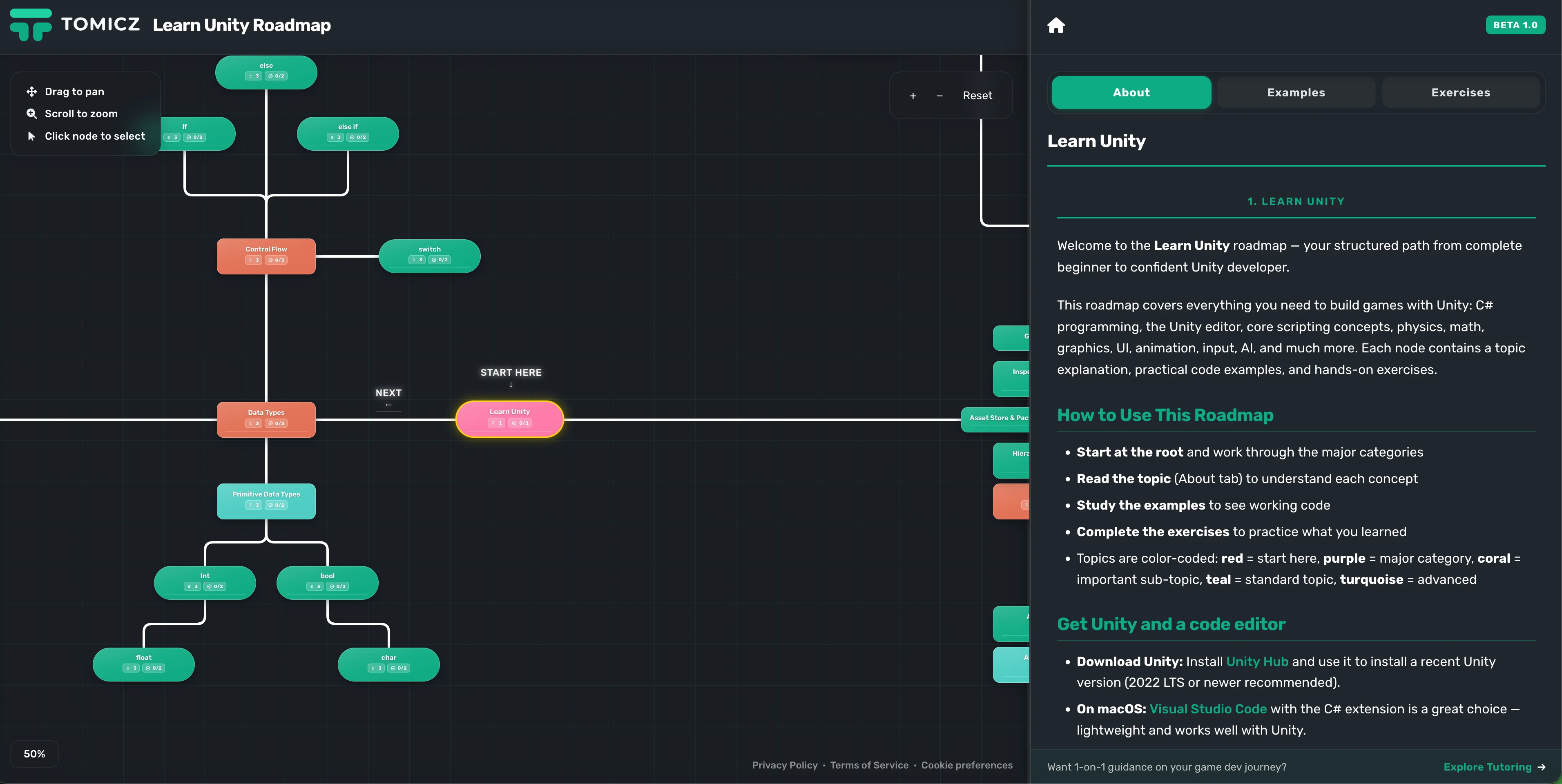
So how does it work? When you open the roadmap, you will see a graph of nodes, and each one is clickable. Every node is a lesson with a description, code examples, and exercises you can complete. Drag with your mouse to move around and explore all the nodes.
If you find a bug or something broken, please contact me at [email protected].
Should beginners use AI while learning Unity?
Beginners should use AI, and also should not. The line is simple: use AI for learning, not for writing your code. The moment you let AI write the code, you have no idea what is happening in your project. You are essentially shipping a black box, which is code you did not write and do not understand. Entire projects get bricked this way. A new developer prompts AI, the first version looks cool, but as they add more features, AI starts to hallucinate and the whole thing falls apart.
AI writes bad code when you don't know the fundamentals
The deeper issue is that beginners don't understand the underlying fundamentals of programming, and AI will just do what it is told, without considering good practices. AI will happily create a monolithic class with 10,000 lines of code, and good luck reading that. It also creates duplicate code that does roughly the same thing, and when you go to update it, AI gets confused about which version to use because they look similar. That is when the hallucinations really kick in.
AI picks the wrong defaults for beginners
Take Unity's input systems as an example. Unity has three input systems, and you as a beginner cannot know which one is right for you. The older ones are easier for beginners, but you might want to learn the modern version for future-proofing because you read that advice somewhere. But future-proofing means nothing when you are a beginner. If you are on a modern version of Unity, AI will usually pick the modern input system. For you as a beginner, an older version might actually be a better fit so you can get a feel of how input works in Unity. But because you are a beginner, you do not know this, and most of the time you will just let AI do its thing.
Do you still need to learn C# if AI writes the code?
Yes, more than ever. There is a big misconception that AI will write all your code for you, and to some extent that is true. AI can write working C# for simple tasks, and it does it fast. But writing code and understanding code are two different skills. If you don't know C#, you cannot read what AI produced. You cannot spot the bug. You cannot refactor. You cannot tell AI what to fix, because you don't know what is broken. The people who learn C# properly are the ones who end up using AI well. The people who skip it become prompt operators, not developers.
What should every Unity beginner know?
Primitive data types are what I always recommend starting with. In order to build anything in Unity, you have to know the basics: integers, floats, and bools. Every variable you write, every piece of state your game holds, starts here. A player's health is an int. A move speed is a float. Whether the player is jumping is a bool. If you don't understand these, you cannot read your own code, let alone AI's. I wrote a full breakdown on this topic: Primitive Data Types for C# Unity Developers. Read that before anything else.
Conditionals
Conditionals come next. Learn those. They let you control the flow of your game state. An if statement is how your game makes decisions. If the player's health drops to zero, the game ends. If the score passes a threshold, the level advances. If the player presses space, they jump. Every piece of gameplay logic you will ever write is built on conditionals. Start with if, else, and else if. Then move to switch when you have more than a few branches. Without conditionals, your game just runs in a straight line, and nothing reacts to the player.
Methods and classes
Methods and classes come after conditionals. They help you decouple code into manageable wrappers, and with them it becomes much easier to control AI output. If you don't understand methods and classes, AI will produce those large monolithic classes that are unmanageable. But if you know them, you can tell AI exactly what structure you want. You can ask it to put movement logic in a PlayerMovement class, input handling in an InputReader, and health in a HealthComponent. That is how professional Unity code is organized. Methods and classes are also the first real step into thinking like a programmer instead of writing spaghetti.
Keep it simple
Some will argue that beginners need to learn more, but I disagree. If a beginner learns just these basics, they can build games. What I don't like about other teachers is that they start teaching their students advanced topics too early, like interfaces, and the student gets too much information at once. My rule of thumb is: can you build a game without ever using an interface? Yes, you can. So don't teach it to a beginner. Only teach simple and useful things that do not overwhelm them. To build a Ping Pong game, that is all you need, at least from a programming perspective.
Unity API
What I named so far are C# essentials, but there are things that are Unity-specific, often called the Unity API. For your C# code to work, it has to interact with Unity's API. Say you are building that Ping Pong game and you want to move the paddle up or down. You will need the built-in input system to do that. Say you want to display the score on screen. You need to use Unity's UI system. Say you want to move the ball. You will use either a Rigidbody or the Transform component. These are the Unity pieces you cannot avoid, and they sit on top of your C# knowledge. Once you know these pieces, the next layer is using them well, which is what 10 essential tips every Unity developer must know covers.
Is AI the new tutorial hell?
AI is not bad. I personally use AI a lot and barely write any code by hand, and we have to accept that it is the future. But the reason I compare it to tutorial hell is that it has a similar effect. Back in the day, you would watch one tutorial after another and never actually practice what you watched. You got stuck in this tutorial circle that people started calling tutorial hell. The same thing happens with AI today. Beginners start building things with AI, then they hit a problem AI cannot solve, so they scrap the project and start a new one. Then the cycle repeats. It is a real phenomenon, and a lot of people in the computer science world are already talking about it.
Is Unity hard to learn for beginners?
No, it is not, and it depends on how you define "hard". If you focus on the fundamentals I covered in the previous sections, you will be fine. The problem I had when I started was that everybody was telling me how difficult programming is and that not everybody can learn it, and it scared me away. It is just that everyone defines "learning programming" differently, and every developer has their own version of the answer. In reality, it is very simple to learn. It takes a few months to become productive. But to master programming takes five to ten years, depending on how smart you are and how lucky you were to be in the right environment.
So don't be scared, embrace it. Repetition is what you need. Just keep practicing and you will get there. And with the AI tools we have nowadays, it is easier than ever in human history to learn it.
Learn Unity, embrace AI
Learning Unity has never been easier, and my advice to beginners is to embrace AI. Don't listen to anyone on Reddit or other places telling you how bad it is. Just learn and keep grinding. Programming is shifting, and you don't want to be left behind. The best thing about AI is that we can finally build the things we have always wanted to build. The result is that we will see more good games in the future as AI keeps advancing.
Read next
10 Mistakes I Made Learning Unity Alone (Cost Me Years)
How I Learned Unity the Wrong Way
