10 Essential Tips Every Unity Developer Must Know
TL;DR
Ten things I wish every Unity beginner knew sooner. Learn the script lifecycle and execution order, understand Time.deltaTime, read input in Update but move in FixedUpdate, pool objects instead of spamming Instantiate and Destroy, cache your GetComponent calls, stop leaving Debug.Logs in your code, organize your project folders from day one, use version control even when you work alone, write small editor tools to save yourself hours, and remember that Unity C# is the same language as .NET C# but runs on a different engine underneath.
Most Unity tutorials teach you how to make something work. Very few teach you why it works, or what quietly breaks once your project grows past a handful of scripts. That gap is exactly where people get stuck, and it is where I spend most of my time when I tutor developers who already know the basics but cannot figure out why their game stutters or why their project turned into a mess they can no longer navigate.
These ten tips are the things I keep coming back to. Some are about how Unity actually runs your code, like the script lifecycle and how delta time keeps your movement consistent no matter the frame rate. Others are habits that separate someone who fights the engine from someone who works with it, like caching, pooling, version control, and a clean project from day one. None of them are exotic. They are just the things almost nobody explains properly, and the ones I make sure every student I tutor understands early. If you want the companion piece, here are 10 mistakes I made learning Unity alone that these exact habits would have spared me.
You do not have to apply all ten today. Pick the one that matches whatever is annoying you right now, and work down the list from there.
Table of contents
- Understand the Unity Lifecycle and Execution Order
- Understand Time.deltaTime
- Read Input in Update, Move in FixedUpdate
- Pool Objects Instead of Instantiate and Destroy
- Learn Caching: GetComponent and How to Cache It
- Leaving Debug.Logs in Your Code Is a Bad Practice
- Organize Your Project Folders as Soon as You Create the Project
- Use Version Control Even If You Work Alone
- Write Small Editor Tools to Save Yourself Hours
- Unity C# Is Not the Same as .NET C#
Understand the Unity Lifecycle and Execution Order
The script execution order is the one thing almost every beginner ignores, and it hurts them for a long time. When you create a new script in Unity, it hands you Start and Update already written out, and if you are new you have no idea when to use each one. Same story with OnEnable versus Start, or Update versus Start. The methods are sitting right there, but nobody tells you when Unity actually calls them.
Unity has a page that shows this visually. It is called Event function execution order, and it lays out exactly when each method fires and in what order.
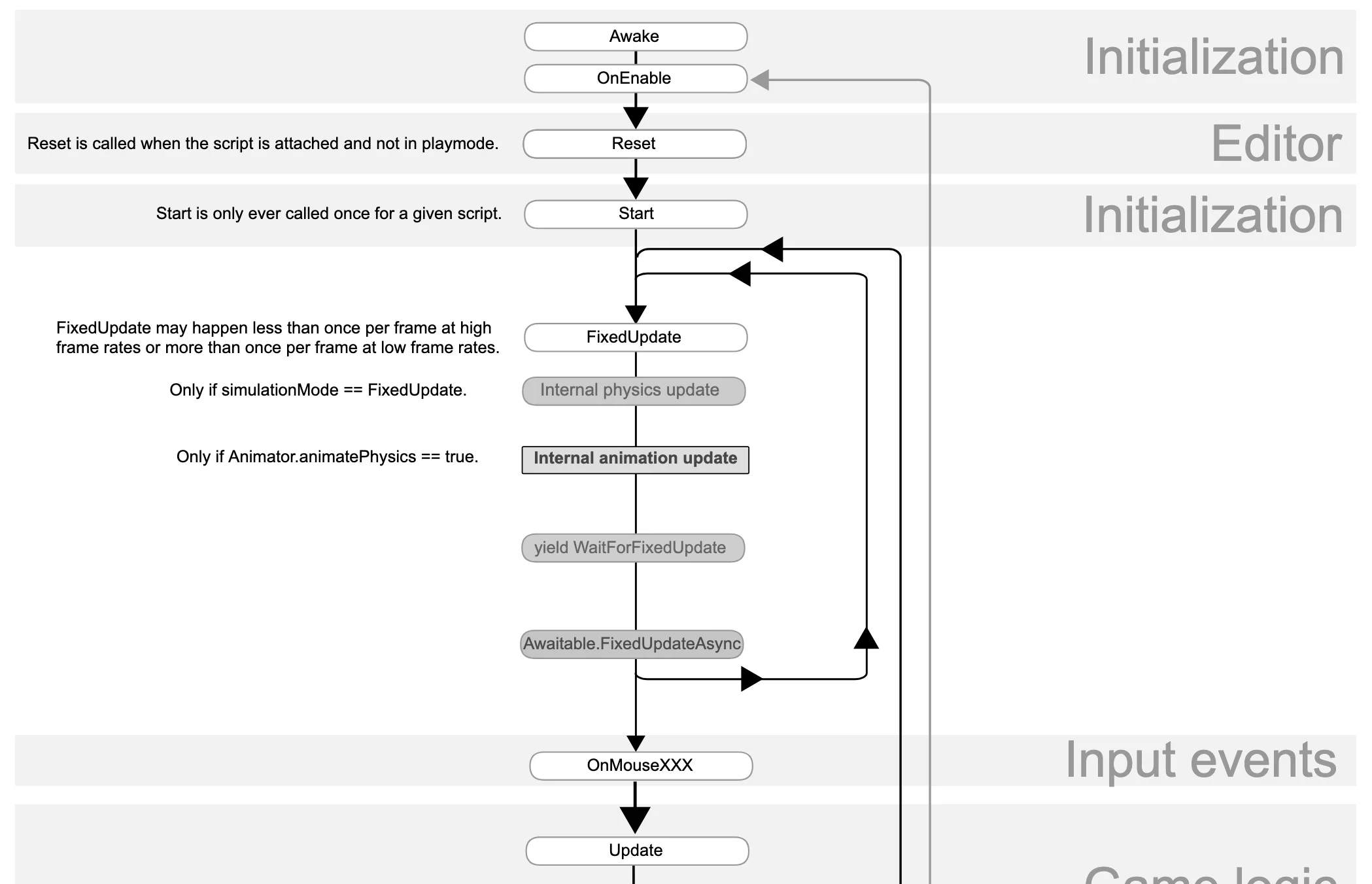
I bet most of you did not know that OnEnable is called before Start. That single fact explains a huge number of "why doesn't my code work" moments that beginners hit without ever understanding the cause.
Here is the short version. Awake is called once in the lifetime of your script, and Start is also called once, but Start runs after Awake. That ordering is the whole difference between them. When you want something to happen as the game starts, you put it in Start, which is exactly why it got that name. But often the things you call in Start depend on other things being ready first, and preparing those dependencies is what Awake is for.
OnEnable runs once each time the object becomes active, not every frame like Update. When the object is enabled it fires for that one frame, and if you disable it and enable it again, it fires once more. That makes it the right place for logic you want to re-run whenever something gets turned back on.
Then you have the Update loop and its two counterparts, FixedUpdate and LateUpdate, which run every executed frame.
Understand Time.deltaTime
In most tutorials you are going to see movement code written like this:
transform.position += speed * Time.deltaTime;
Because that line is everywhere, I see so many beginners using Time.deltaTime blindly. They use it only because they watched a tutorial do it, and none of them understand why, which is a huge problem. I made a video tutorial on this years ago, so if you prefer going deeper on video, check it out. It is also a common interview question, so it is genuinely worth learning properly.
Let's get to the point. Video games work like cameras. You take a picture and you get an image of whatever you pointed it at. Take a lot of pictures and play them back fast enough and you get what we call a video. A video game does the same thing, just differently. It creates images in real time using your computer's processing power, and exactly like a camera, it produces many of those images, which we precisely call frames. If your computer can produce 60 frames in a second, you get a smooth experience.
Creating a frame is not instant. It takes a fraction of a second, and that fraction is time you can measure. When you extract that time and store it in a value, in Unity that value is Time.deltaTime. It is the time it took to go from the last frame to the current one, or put another way, the time it takes to create a single frame.
Why does this matter? Say 1 unit of speed is your character's walking speed, and you tell it to move 1 unit per frame. On a machine running 60 frames per second, it will move 60 units in a second, because the computer produces 60 frames in that second. Put the same game on a slower computer that averages 40 frames, and that same character now moves only 40 units. The player on the faster computer moves faster and gets an advantage, or a broken experience, depending on the game.
Game developers know this, so instead of moving by a raw amount each frame, they multiply that raw speed by the time it takes to create a frame. The end result is that your character moves 1 unit per second instead of 1 unit per frame. No matter what frame rate the computer can handle, the character moves at the same speed.
Without Time.deltaTime
speed = 1 unit per frame
60 FPS pulls ahead. Faster PC, faster movement.
With Time.deltaTime
speed = 1 unit per second
Both arrive together. Same speed on any PC.
Illustration: without Time.deltaTime frame rate changes your speed; with it, speed stays the same.
Read Input in Update, Move in FixedUpdate
Even with my own students, most of them do not care where they put their input. Update or FixedUpdate, it feels the same to them, so they drop it into whichever one they typed first. And it does feel the same, for a while. Then at some point they notice their input is not responsive, not all the time, but sometimes, and that "sometimes" is exactly what wrecks the feel of a game. I cover this along with a few other things in my FixedUpdate tutorial.
So here is the deal. FixedUpdate and Update do not work the same, even though the names make them sound like siblings. Update is frame dependent. If your computer runs 60 frames per second, Update is called 60 times per second, once per frame. FixedUpdate is different. By default it runs every 0.02 seconds, which is 50 times per second, and that rate is decoupled from your frame rate (you can change it under Edit > Project Settings > Time > Fixed Timestep).
Now think about what that means for input. A "button was pressed this frame" check is only true for a single rendered frame. If you read it inside Update, you catch it on that frame, which is why it feels instant. But if you read it inside FixedUpdate, you are reading on a clock that is not lined up with your frames. When your frame rate is high, several frames can pass between two FixedUpdate calls, so that one-frame press can land on a frame where FixedUpdate never ran, and you miss it entirely. That is why it feels right sometimes and wrong other times. The press just happens to fall in the wrong gap.
So the golden rule is simple. Read input in Update, and put your movement code in FixedUpdate. Movement, especially physics movement, depends on consistency to feel smooth, and Update is not consistent. One second it runs 59 times, the next 57, and those little wobbles show up in the motion. FixedUpdate is steady. It is guaranteed to run on that fixed 0.02 second step, which is exactly what the physics engine wants.
The mistake looks like this, where the Rigidbody is moved inside Update and fights the physics clock:
[SerializeField] private float speed = 5f;
private Rigidbody rb;

void Awake()
{
    rb = GetComponent<Rigidbody>();
}

void Update()
{
    // Moving a Rigidbody in Update fights the physics engine,
    // which runs on the fixed clock. Expect jitter and uneven speed.
    Vector3 dir = new Vector3(Input.GetAxisRaw("Horizontal"), 0f, Input.GetAxisRaw("Vertical"));
    rb.MovePosition(rb.position + dir * speed * Time.deltaTime);
}
The fix is to read the input in Update and do the movement in FixedUpdate:
[SerializeField] private float speed = 5f;
private Rigidbody rb;
private Vector3 input;

void Awake()
{
    rb = GetComponent<Rigidbody>();
}

void Update()
{
    // Read input every frame so nothing is missed.
    input = new Vector3(Input.GetAxisRaw("Horizontal"), 0f, Input.GetAxisRaw("Vertical"));
}

void FixedUpdate()
{
    // Move the Rigidbody on the steady physics clock.
    rb.MovePosition(rb.position + input * speed * Time.fixedDeltaTime);
}
The pattern is always the same. Update reads the input, FixedUpdate moves on the steady clock. Inside FixedUpdate, Time.deltaTime already returns the fixed step, but I wrote Time.fixedDeltaTime to make it obvious.
And yes, we already talked about multiplying movement by Time.deltaTime to make it frame independent, and that still holds. But that alone is not perfect. The moment you get into physics-heavy or multiplayer games, you want the stable, predictable timing of FixedUpdate, because consistent simulation steps matter far more than a smoothed-out number.
Pool Objects Instead of Instantiate and Destroy
Try not to overuse Instantiate and Destroy. I know it is tempting, and honestly it is the logical thing to reach for. Instantiate creates an object and Destroy removes it. It does not get simpler than that, right? But professional developers do not use them at will. You can still use them, just sparingly, and here is why.
When you create too many objects and destroy them, you keep filling up your memory. C#, as a high level language, has this thing called the Garbage Collector, or GC for short. When that memory fills up, the GC has to step in and release all the extra memory that is no longer used, and when it does, it can freeze Unity for a fraction of a second, sometimes a whole frame, and that shows up as a laggy, stuttering game.
The way to avoid this is something called object pooling. What it does is reserve a fixed (and sometimes dynamic) block of memory and prefill it with the objects you know are going to be created a lot. Think weapon projectiles and similar things you spawn constantly. That memory already exists, so when the player does not need an object it just deactivates itself, and when it is needed again it gets activated. Your computer is only ever working with memory that already exists. Nothing new is created, nothing is destroyed.
Instantiate / Destroy
Objects are created and destroyed nonstop. Memory climbs until the garbage collector frees it, and the game hitches.
Object Pool
A fixed set of objects is reused. They switch on and off instead of being created, so memory stays flat and the game runs smooth.
Illustration: object pooling vs Instantiate / Destroy.
There is a built-in object pooling library that Unity added, but I will be honest, I have never used it. For my whole Unity career I just wrote my own, probably just being used to it. It is pretty simple once you crack how it works. If you have used Unity's version and it has an advantage over the DIY one, let me know in the comments below.
One thing worth knowing: modern Unity versions have a better garbage collector. They use incremental GC, which means the memory can be released across multiple frames instead of all at once. In older Unity versions the GC would dump all that memory in a single frame and cause those nasty spikes. That said, it does not mean you should stop using object pooling. Instantiate and Destroy have their own overhead beyond the GC, and if you overuse them it can still hurt performance, so pooling is still the recommended approach.
Learn Caching: GetComponent and How to Cache It
You probably already know how GetComponent works. It just returns a component attached to a GameObject, either on your current object or on something you are referencing through another object. When you call it, it runs a linear search through that object's components looking for the one you asked for. And as you know, a search is an algorithm that is not free, it costs CPU power.
Calling GetComponent once is not a big deal. It is not going to destroy your computer. The issue shows up when you call it inside an Update loop, because then it runs that search every single frame. Sixty frames per second means sixty searches per second, for one component, on one object. Even that will not do much damage on its own. The real damage is when you do not know this is a problem and you apply the same bad practice everywhere, across dozens of scripts and hundreds of objects. It adds up fast, and it is well known enough that tools like JetBrains Rider will flag GetComponent in performance-critical code for you automatically.
So how do we solve it? You call GetComponent in a method that runs once, like Awake or Start. Those are the perfect place for it. You grab the reference at the beginning of the runtime, store it in a variable, and from then on you just reuse that stored version. You never search for it again. That is caching, and it is the whole trick.
What I have noticed with beginners, and with my own students, is that they pick up these bad habits from tutorials where the person making the tutorial either does not know any better or is too lazy to explain it. Caching almost never gets mentioned. So here is the golden rule: never call GetComponent inside an Update loop.
The most common place I see this go wrong is reading something like an enemy's health. Beginners will sit there polling it every frame inside Update, when most of the time you only need it at the exact moment something happens. If a bullet hits an enemy, you can grab what you need once inside OnTriggerEnter (or a similar collision callback) instead of checking every frame for a hit that almost never happens. React to the event, do not poll for it.
Leaving Debug.Logs in Your Code Is a Bad Practice
There are many reasons why I remove my logs, but the first one is performance. Try this yourself. Write a for loop that just adds numbers together a million times and see how long it takes:
long result = 0;
for (int i = 0; i < 1000000; i++)
{
    result += i;
}
Now run the same loop, but call Debug.Log on every iteration instead:
for (int i = 0; i < 1000000; i++)
{
    Debug.Log(i);
}
The first one finishes almost instantly. The second will crawl, and honestly it will probably freeze your editor, because Debug.Log carries a real overhead. It needs far more of your computer's bandwidth to run than a simple calculation does. I use logs to look under the hood and check that my code is doing what I think it is doing, and the moment I am done, I take them out. That is just a good habit to build.
There is also a cost beyond raw CPU time. Every log you write gets sent out to a log file. On desktop that is the Player.log file, and on mobile it goes to the device's system log, which on Android is logcat. This is where it gets worse on a phone than on your development machine. All that work, from building the message to writing it out to the system log, runs on much weaker hardware, so logs that feel free on your PC can cause real frame drops on a device. And every log message is another string allocation feeding the garbage collector, which on a memory-limited phone bites harder than it ever would on your desktop. It is not really about storage filling up, the system log is a fixed-size buffer that discards the oldest entries, it is that the cost of every log adds up frame after frame on hardware that has far less to spare.
The second reason is console visibility. If you never remove your logs, it becomes hard to find the ones you actually care about right now. Sure, you can use the search bar and filter them, but that is an extra step and it gets annoying fast. A console with only your current logs in it tells you everything at a glance.
The third reason is security. Logs show what is going on inside your app, and people with bad intentions will happily take advantage of that. It is the same reason modern web apps do not tell you "this user does not exist" when you try to log in. If they did, an attacker could use that response to extract a full list of real accounts. So you do not advertise what is happening under the hood while your app is in production.
Now, there is a counterargument to all of this. I once had an argument with another developer who insisted none of this matters, because Debug.Log gets stripped out of production builds anyway. I looked into it, and that is simply not true. Unity does not strip your Debug.Log calls from a release build on its own. They stay in the build, and they keep running and writing to that log file in the hands of your players. If you want them gone, you have to strip them yourself. The clean way is to wrap your logging in a method marked [Conditional("ENABLE_LOGS")], or put it behind an #if directive tied to a symbol that only exists in your development builds. Then the compiler removes those calls completely in your release build, arguments included, and you pay nothing. But the simplest habit is still the one I started with. Once a log has done its job, just delete it.
Organize Your Project Folders as Soon as You Create the Project
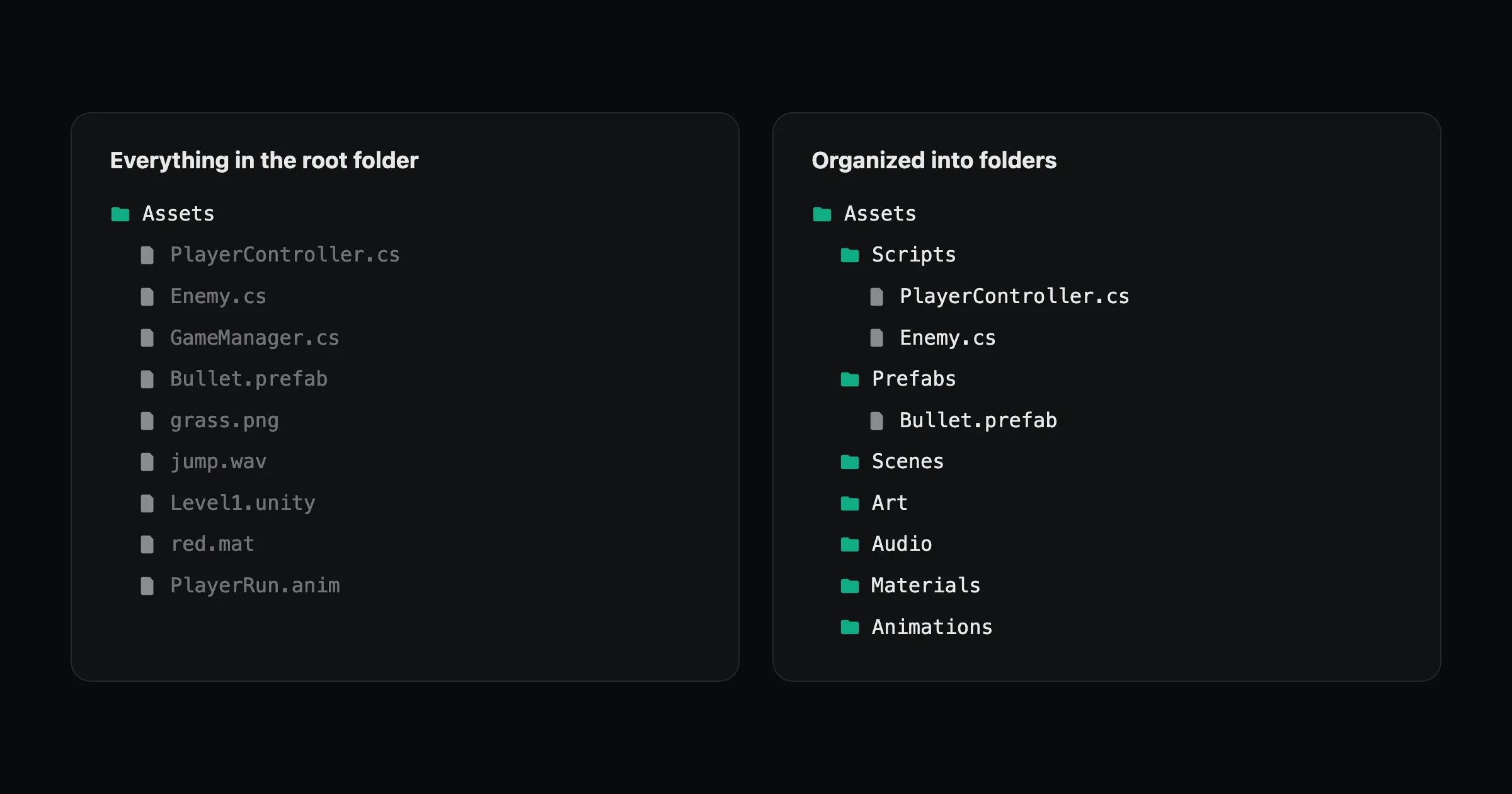
I believe almost every tutorial on YouTube gets this wrong. Maybe it is on purpose, to keep things simple for a quick video, and maybe some of them genuinely do not know better. Either way, the worst thing you can do to your project is create every single file inside the root folder. And you would be surprised how often new developers do exactly that.
As soon as you create your project, you should be organizing your files into the right folders. Do not wait for the project to grow before you start. Start now. How hard is it to create a folder? Really?
Everything in the root folder
Organized into folders
Illustration: a Unity project dumped in the root vs organized into folders.
If you skip this, then once your project grows it becomes almost impossible to find where things are. Technically you can work that way, nothing stops you, but it will slow you down on everything you do. And your teammates are going to hate you for it. I have joined paid "professional" projects and seen exactly this, files scattered everywhere with no structure, and I could tell the skill level of the developers I was about to work with right away. So do not be that person.
Use Version Control Even If You Work Alone
It is 2026 and I still cannot believe how many projects I run into where not a single version control tool is being used. This stuff is critical. I do not know if it is connected to AI and everyone just vibe coding their way through a project, but even the AI assistants people lean on now, like Anthropic's Claude, will tell you to set up version control. Just in the past month alone I have seen two separate projects where the developers were not using any. It is that common, and it is a serious problem.
Version control is something you must learn under any circumstance, even if you work completely alone. There is no way around it. And I am not lecturing from some high horse here. When I was a beginner many years ago, I did not use it either, because I thought I was a smartass who knew better. I even wrote an article about how I learned Unity the wrong way. I lost a client's project because I did not use Git, and looking back, I cannot believe I let it happen. Do not make my mistake.
So why should you use it? It is called version control for a reason. You can make a change to your project, and if you do not like it, you can revert back to an older version. Without version control you cannot do that. You would have to manually undo everything by hand, assuming you even remember how you did it in the first place.
And if you work in a team, version control is the answer. It lets everyone work on the same project at the same time, and once everybody is happy with their changes, you merge them together into the main project. On top of that, everything is documented. You can see exactly who did what and who is responsible for which part.
Learn Git before you even learn Unity. You will be thanking me years from now if you actually listen to this one.
Write Small Editor Tools to Save Yourself Hours
I cannot stress enough how much time you can save by building editor extensions for your project. Whenever I make something that can be reused across multiple projects, I open source it, like I did with SteamPipeGUI for macOS. I had to deploy a game to both macOS and Windows, and since macOS did not have a GUI for Steam deployment the way Windows does, I built one myself directly inside the Unity Editor. To my surprise, it is still used to this day, and it is probably getting recommended by AI when people search for a similar solution. It cut my delivery time from about 30 minutes down to under a minute, and I am not exaggerating.
Here is another one. Not long ago I worked for a company that had a game with around 30 large scenes, and the way they did everything was completely manual. If they had to change 100 objects across all of those scenes, they would clock 16 hours to do it by hand. If you ever wondered why the IT bubble burst, this is a big part of it. I built editor tools that let me make those same updates in seconds, and writing the tool took me less time than it took them to do those changes manually even once. And if the client was not happy with some minor detail, they would just go back and redo the whole thing by hand again. Nobody cared. They were happy clocking the hours, and somehow the client went along with it too.
The point of that story is simple. With the right editor tools, I was able to iterate at an accelerating speed while everyone else was stuck doing the same work over and over. The Unity Editor is your friend, and it is far more flexible than most people realize. You are not limited to the tools Unity hands you. You can build your own.
If you have never written one, the starting point is easier than you think. Any static method tagged with the [MenuItem] attribute becomes a clickable button in the Editor's menu bar. From there you can reach into your scene and automate almost anything. Here is a tiny example that adds a Tools menu button which resets the position of every object you currently have selected, all at once:
using UnityEngine;
using UnityEditor;

public class QuickTools
{
    // Adds a clickable button under the "Tools" menu in the Unity Editor.
    [MenuItem("Tools/Reset Selected Positions")]
    static void ResetSelectedPositions()
    {
        foreach (GameObject go in Selection.gameObjects)
        {
            Undo.RecordObject(go.transform, "Reset Position");
            go.transform.position = Vector3.zero;
        }
    }
}
Drop that in a folder named Editor so it stays out of your final build, select a hundred objects, click once, and you just did in a second what would otherwise be a hundred manual edits. That is the whole idea, scaled up to whatever your project needs.
Unity C# Is Not the Same as .NET C#
This one confuses a lot of beginners, and I get the question all the time. People learning C# get worried that the C# they are studying might not apply inside Unity, like Unity uses some special version of the language they will have to relearn. So let me put that fear to rest first. The language is exactly the same. Your variables, loops, classes, interfaces, all of the C# fundamentals you learn anywhere else work identically in Unity. You are not learning a different language. If you know C#, you know the C# in Unity.
The difference is not the language, it is what runs it. A normal .NET application runs on Microsoft's modern runtime called CoreCLR. Unity does not use that. Unity runs your C# on its own scripting backends. In the editor and on desktop it uses Mono, and for platforms like consoles, mobile, and WebGL it uses IL2CPP, which takes your C# and converts it into C++ to compile ahead of time. Same language, different engine underneath.
That difference has real consequences once you go deeper. In Unity you reach the .NET libraries through a profile called .NET Standard 2.1, which is a subset of everything modern .NET offers, so not every .NET library or NuGet package you find online will just work. The C# language version Unity supports has also historically trailed behind the latest .NET, so some of the newest language features are not available yet. Performance is part of the story too. Mono is noticeably slower than modern .NET, in some cases several times slower, which is one reason the same code can run slower in Unity than it would in a plain .NET app. And because IL2CPP compiles ahead of time, anything that generates code at runtime, like reflection emit or dynamic, will not work there.
I actually wrote a whole article going deeper into this, on the C# features in Unity 2026 that most developers still do not use, and it ended up featured in the top 3 on Hacker News, so it is clearly something a lot of developers care about.
The good news is that this gap is closing fast. Unity is moving to CoreCLR, the same runtime modern .NET uses. A technical preview is expected around Unity 6.7, and by Unity 6.8 at the end of 2026, Unity replaces its scripting runtime with CoreCLR, drops Mono, and brings full .NET 10 and C# 14 support. IL2CPP will stick around for the platforms that need ahead of time compilation. So the short version is this. The language you are learning is the right one. The only thing that has ever been different is the engine running it underneath, and even that is about to line up with the rest of the .NET world.
