SteamPipeGUI for macOS: Build and Upload to Steam Directly from Unity

TL;DR
SteamPipeGUI for macOS is my free, open source Unity Editor tool that builds and uploads your game to Steam without touching the CLI or .vdf scripts. Install via Package Manager using the GitHub URL, create a Deployment Target per platform, click Generate Build and then Upload. Version 1.3 adds multiple depots, a set live branch, a headless batch mode, and a Claude Code skill so an AI agent can run the whole release for you. Publish time drops from roughly 30 minutes to under one.
SteamPipeGUI for macOS is a free, open source Unity Editor tool that lets you build and upload your game to Steam directly from Unity, without using Steam's command line. It runs in the Unity Editor on macOS and builds for macOS, Windows and Linux. It brings Steam deployment on Mac in line with the Windows SteamPipeGUI experience. If you release on Steam and develop in Unity, this tool can cut your publish time from around 30 minutes to under a minute.
Summary
SteamPipeGUI for macOS (Unity) is a Unity Editor extension for Steam build and upload. You need a Steamworks account, Steamworks SDK, and an app plus depot set up in the Steamworks dashboard. Install via Unity Package Manager from the GitHub repo, create a Deployment Target per platform, then click Generate Build and Upload. Since version 1.3 the same steps also run from a terminal or from an AI agent. Author: Darko Tomic. Repository: https://github.com/tomicz/steam-pipe-gui-macos-unity.
Table of contents
- What is SteamPipeGUI for macOS?
- Why use SteamPipeGUI for Unity?
- Requirements
- How to install SteamPipeGUI in Unity
- How to deploy to Steam from the Unity Editor
- What changed in version 1.3?
- How do you upload to Steam without the Unity GUI?
- Can an AI agent publish your Steam build?
- Git repository and more Unity open source
What is SteamPipeGUI for macOS?
SteamPipeGUI for macOS (Unity) is a Unity-native tool that streamlines building and uploading games to Steam. On Windows, Valve's SteamPipeGUI offers a simple UI. On macOS there is no official GUI, so developers usually rely on Steam CLI and .vdf scripts. This tool adds a GUI workflow inside the Unity Editor on macOS, so you can build and upload to Steam without leaving the editor or running terminal commands manually.
Why use SteamPipeGUI for Unity?
Without a GUI on macOS, Steam deployment means configuring launch options, depots, and .vdf files by hand. That is slow and error-prone. With SteamPipeGUI for macOS, the same flow takes under a minute from the Unity Editor. You get one workflow for building and uploading from Unity, fewer copy-paste mistakes with depot config, and a faster release loop for betas and patches. Plenty of studios ship this way, and I collected some of them in 10 Steam games built with the Unity game engine.
Requirements
You need a Mac running Unity 2018.3 or newer (the tool is tested on Unity 2022.3), a Steamworks account, an app and at least one depot set up in the Steamworks dashboard, and the Steamworks SDK unpacked on your machine. The repo README explains how to create an app, get your App ID and Depot ID, and configure launch options and depots. Once that is done, the tool handles the build and upload steps.
How to install SteamPipeGUI in Unity
- Open your Unity project.
- Open Window > Package Manager.
- Click + and choose Add package from Git URL (Unity docs).
- Enter
https://github.com/tomicz/steam-pipe-gui-macos-unity.gitand click Add.
To stay on a specific release, append the tag, for example https://github.com/tomicz/steam-pipe-gui-macos-unity.git#v1.3.0. Every release is listed on the GitHub releases page.
How to deploy to Steam from the Unity Editor
In the Project window, right-click and go to Create > Tomicz > Steam > Deployment Target. Create a target per platform (e.g. one for macOS, one for Windows), then fill it in. The numbers below match the screenshot.
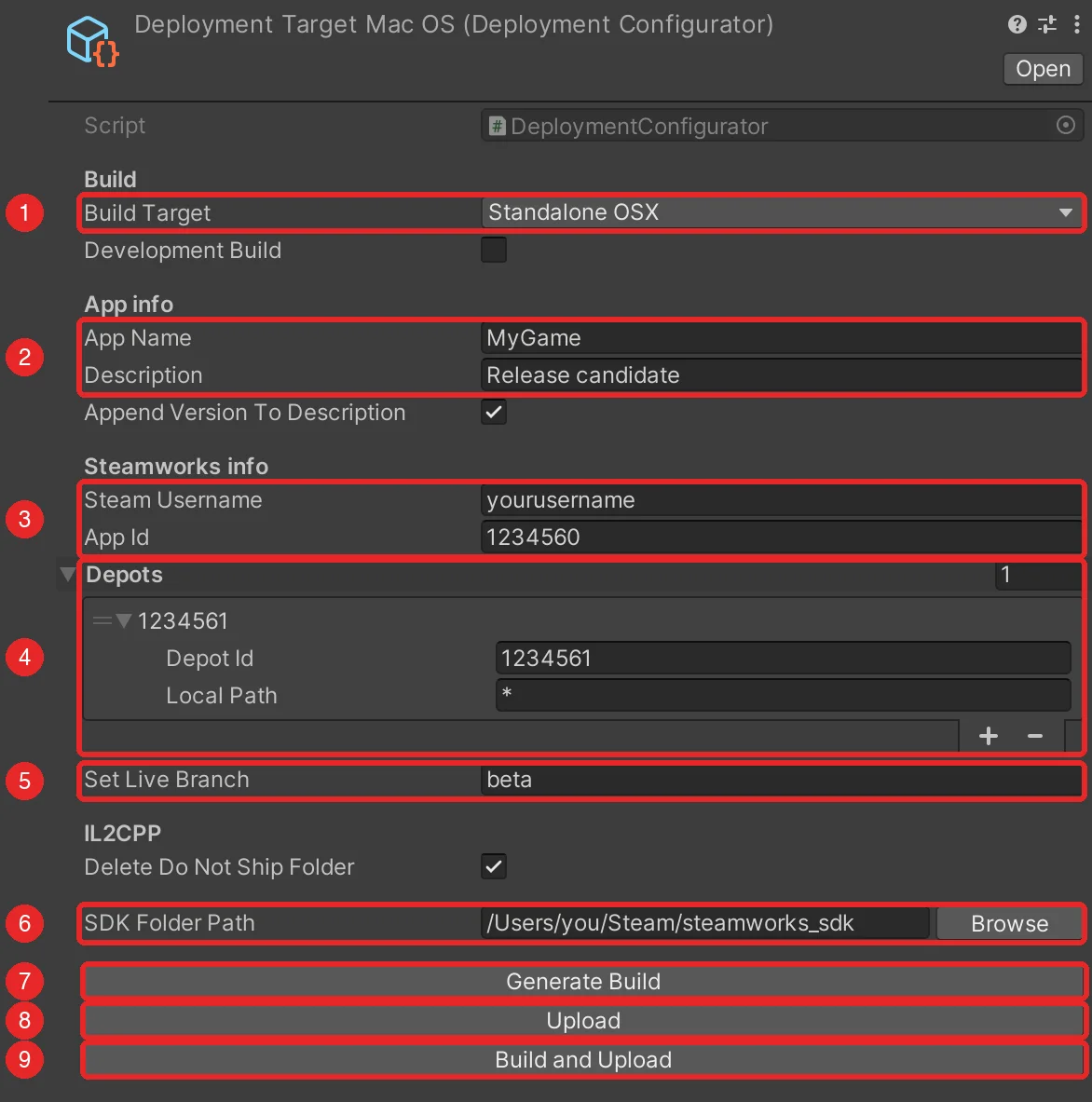
- Build Target. StandaloneOSX, StandaloneWindows, StandaloneWindows64 or StandaloneLinux64. Tick Development Build for a build with the profiler connection.
- App Name and Description. The app name is the executable name and must match your Steamworks launch options. Tick Append Version To Description to add the version from Player Settings automatically.
- Steam Username and App ID from the Steamworks dashboard.
- Depots. One entry per depot that receives the build. Most games need a single entry with Local Path
*. Add more for DLC or shared-content depots and give them a subfolder pattern such asDLC/*. - Set Live Branch. The branch the upload goes live on. It defaults to
beta. Leave it empty to upload without setting it live and pick the build manually in Steamworks. - SDK Folder Path. Click Browse and select the root of the Steamworks SDK. The path is saved with the target, so you do this once.
- Generate Build builds the scenes enabled in Build Settings into the SDK content folder.
- Upload opens a Terminal window that runs steamcmd. Enter your Steam password and Steam Guard code when asked. When finished, your build appears under Steamworks > SteamPipe > Builds.
- Build and Upload runs both steps and stops if the build fails.
Use a clear description for each build (e.g. "Target: StandaloneOSX 0.0.x") so you can tell them apart later, or let the version toggle do it for you.
What changed in version 1.3?
The first release had one Build Target button and a single Depot ID. Version 1.3 keeps the same one-minute flow and fixes the things that bit people in real projects.
Build and upload are separate steps. You can generate a build, inspect it, and upload later. Build and Upload still does both in one click.
Multiple depots. Each target holds a list of depots with a Local Path pattern, so a DLC depot can take a subfolder while the main depot takes everything.
Set Live Branch. The branch used to be hardcoded to beta. Now it is a field, and an empty value uploads without setting the build live.
Checks before anything runs. Missing fields, a wrong SDK path, no scenes in Build Settings, or an upload without a build are reported in the Console up front instead of failing halfway through steamcmd.
Small things that used to break. The SDK path is saved with the target instead of resetting on every script reload. SDK folders with spaces in the path work. The IL2CPP _BackUpThisFolder_ButDontShipItWithYourGame folder is deleted only when you click Upload, so you can back it up first.
The full list is in the changelog.
How do you upload to Steam without the Unity GUI?
Everything the buttons do also runs through Unity batch mode. Close the project in the Unity Editor first, because batch mode cannot open a project that is already open. Then point Unity at the target asset.
UNITY=/Applications/Unity/Hub/Editor/2022.3.62f2/Unity.app/Contents/MacOS/Unity

"$UNITY" -batchmode -nographics -quit -projectPath . -logFile - \
  -executeMethod Tomicz.Deployer.CommandLine.BuildAndPrepareUpload \
  -deploymentTarget Assets/Deployment/MacOS.asset

sh "/Users/you/Steam/steamworks_sdk/tools/ContentBuilder/scripts/upload_build_1234560_StandaloneOSX.sh"
The first command validates the target, builds the player, rewrites the .vdf scripts, and writes an upload script next to them. The second command runs steamcmd with that script. steamcmd asks for your password and Steam Guard code the first time, then caches the login, so later uploads run without any typing. A CreateTarget entry point creates or edits a target from arguments, so a whole deployment can be set up from a terminal or a CI job. The README on GitHub lists every argument.
Can an AI agent publish your Steam build?
Yes. The package ships a Claude Code skill in its Skills~/steam-deploy folder. Copy it into your Unity project and Claude Code learns the whole flow, plus the rules that keep it safe. It never handles your Steam password or Steam Guard code, it refuses to run while the project is open in the editor, and it asks before an upload that sets a build live.
mkdir -p .claude/skills
cp -R "$(ls -d Library/PackageCache/com.tomicz.unity-steam-macos-deployer@* | head -1)/Skills~/steam-deploy" .claude/skills/
After that, open Claude Code in the project and ask for what you want, for example "build the macOS target and upload it to Steam". The agent creates or updates the deployment target, runs the build, and hands you the upload command to confirm.
Git repository and more Unity open source
Git repository: https://github.com/tomicz/steam-pipe-gui-macos-unity
Latest release: github.com/tomicz/steam-pipe-gui-macos-unity/releases/latest
For more Unity open source projects, see github.com/tomicz.
