What is Unity DOTS in 2026? Do You Actually Need It?

TL;DR: Unity DOTS is a framework built on three pillars, ECS, the C# Job System, and the Burst Compiler, that shifts your game from object-oriented code to data-oriented design. In 2026 it is production-ready. Use it for massive scale like RTS crowds, zombie hordes, or physics-heavy simulations. Skip it for simple 2D platformers, puzzle games, or UI-heavy apps.
Unity DOTS Guide to ECS, Job System, and Burst
I've been focused on DOTS quite a bit recently, which stands for Data Oriented Technology Stack. Not a single day passes that I don't see a forum or Reddit post about it. What is Unity DOTS? Should I use Unity ECS? How do I use DOTS? Is it worth learning DOTS? When to use Unity DOTS?
In 2026 the core DOTS packages are more stable and production ready than during the experimental years. You can treat that part as settled while you still decide whether your game actually needs the stack.
Many discussions were created on the DOTS topic, but not many quality answers were provided. And the reason for that is that it is not a simple technology to explain in one post. So this article is going to answer all your questions in one place.
If you want a practical follow-up after this overview, read Getting started with Unity 6 DOTS and ECS in 2026. That guide walks through packages, SubScenes, baking, and a repeatable MonoBehaviour versus ECS FPS comparison.
What is Unity DOTS? DOTS Explained
Unity's Data Oriented Technology Stack framework, in simple words, is designed to change focus from objects to data. While traditional development uses MonoBehaviour to manage its own logic, DOTS uses Systems to process batches of data.
To make it possible for your computer to process all the data in batches, DOTS has three main pillars.
First, Entity Component System (ECS) is an actual architecture for organizing your data. Second is C# Job System that lets your game run parallel tasks on multiple CPU cores. Third is Burst Compiler, which optimizes machine code.
Stack vs Heap
Before we proceed to explain ECS, C# Job System, and Burst Compiler, I want to first show you why DOTS is better than the traditional Object Oriented Programming approach. And I cannot do it without teaching you about Stack and Heap memory. Also, Stack vs Heap is a very common candidate filtering interview question, and it is worth learning about it.
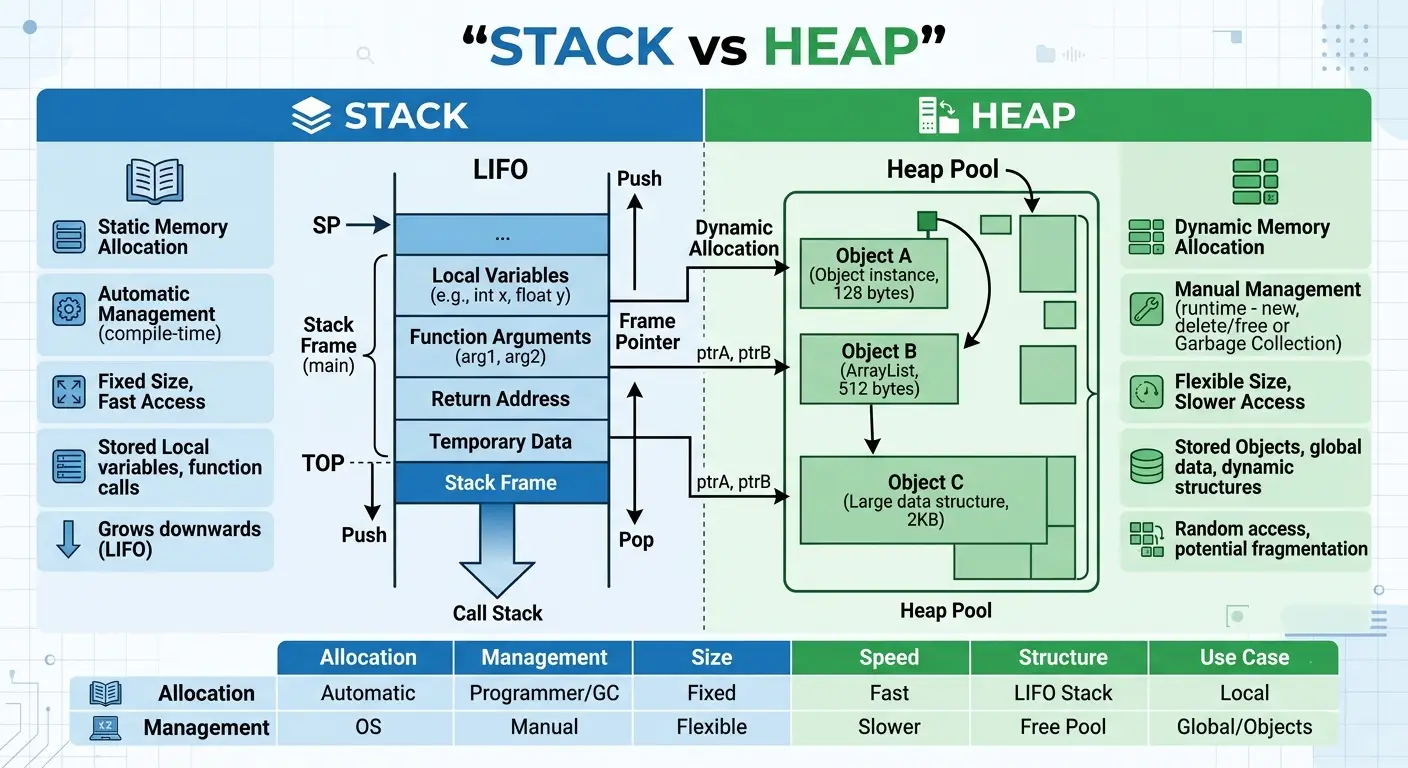
RAM, or Random Access Memory, has two types of memory. Stack and Heap.
Stack
A stack is a contiguous block of memory (check the image above). It is small in memory, often a few megabytes. But it is super fast. Because your CPU will call and store data in a strict "Last-In, First-Out" (LIFO) order.
Think of it like a stack of plates: you can only add or remove the top one. The CPU doesn't have to "search" for your data; it always knows exactly where the next piece is. In Unity, this is where your Value Types (like int, bool, and struct) live while your code is running.
Heap
The Heap is the opposite. It is a massive, unorganized area where your Reference Types (like classes and strings) live. When you create a new GameObject, Unity has to find an empty "slot" anywhere in this big area.
Because the data is scattered all around, the CPU has to use a pointer or a memory address to go and find it. This "jumping around" is what makes traditional Unity slower when you have thousands of objects.
Quick Interview Tip: If an interviewer asks about the difference, remember: The Stack is for temporary, fast, and small data (Value Types), while the Heap is for long-term, large, and dynamic data (Reference Types).
What Stack & Heap have to do with DOTS?
The logical step would be to put everything into the Stack because it is lightning fast. In theory, that makes sense, but in practice, it is not possible. Since the Stack is small in size, you can't really fit 100,000 entities into it.
That is the exact reason why Unity created DOTS. It solves the problem of scattered memory all over the Heap. It uses Systems to organize data into Native Containers (long, straight lines of memory). This allows your CPU to "stream" data on the Heap almost as if it were on the Stack.
Entity Component System (ECS) Explained
Now that you understand how messy Heap is, let's look at how ECS fixes it. In traditional Unity, you have GameObjects. A GameObject is a "container" that holds everything in its class, self-contained, and it lives on the Heap and points to other classes.
ECS breaks this down into three parts: Entities, Components, and Systems.
Entities - Id
An Entity is not a GameObject, it is just an ID. Think of it like your gym membership card. It doesn't hold any data itself, it just tells Unity that Entity #2351 exists.
Components - Data
This is the most important part. Components are structs or value types. They only hold data, not logic. For example, a Position component only holds x, y, z. Because they are structs, ECS can pack them into a chunk of memory in a perfectly straight line.
Systems - Logic
Systems are where the code lives. Instead of a script on every single enemy, you have one System that says: "Find every Entity that has a Position component and move it by 5." Because all those Position structs are lined up in a row in memory, the CPU can process them at lightning speed. It doesn't have to "jump" around the warehouse, it just runs down the line.
C# Job System Explained
If ECS is about organizing your data into neat lines, the C# Job System is about hiring more workers to process those lines at the same time.
In traditional Unity, almost everything happens on the Main Thread. Think of this like a supermarket with 10 checkout lanes, but only one cashier is working. Even if your data is perfectly organized, that one cashier can only move so fast.
Read a full guide on What is Unity C# Job System? Do I need to learn it in 2026?
Parallel Processing
Most modern computers have 4, 8, or even 16 CPU cores. The C# Job System allows you to take your Systems and split the work across all those cores.
Instead of one cashier processing 10,000 entities, the Job System opens up all 10 lanes. Now, 10 cashiers are processing 1,000 entities each at the same time.
Safety First
The reason we didn't do this easily before is that "multithreading" is normally dangerous. If two cashiers try to scan the same item at once, the system crashes (this is called a Race Condition).
The C# Job System is "safe by design." It works perfectly with ECS because it knows exactly which data each Job is allowed to touch. If a Job is moving an entity, Unity ensures no other Job is trying to delete it at the same time.
Why is the Job System the main DOTS dependency
Without the Job System, ECS would be fast, but it would still be limited to one core. By combining them, you aren't just organized, you are massive. You are using 100% of the hardware you paid for.
IMPORTANT! Unity Technologies did not invent multithreading
It is important to know that multithreading is nothing new. Most languages have it, and C# has had it for years. However, standard C# threads (like System.Threading) don't usually play nice with Unity. If you try to move a GameObject from a background thread, Unity will throw an error.
I am talking from experience, back in my beginner days, I thought that every feature that exists in Unity only exists within the Unity ecosystem. Many features are made from scratch by Unity to align it with the main loop. Non-game software doesn't run in the main loop like video game software, so language built-in multithreading libraries are just enough.
Burst Compiler Explained
If ECS organizes the data and the Job System provides the workers, the Burst Compiler gives those workers special powers.
C# is a high-level language. It is easy for humans to read, but the CPU needs machine code to actually run your game. Normally, Unity uses something called a Just-In-Time or JIT compiler to interpret your code while the game is running. It works fine, but it isn't the fastest interpretation.
How Burst makes it lightning fast
The Burst Compiler is a tool that uses LLVM technology to turn your C# Jobs into highly optimized machine code.
Made exactly for your CPU. It looks at the specific processor your player is using and writes the machine code specifically for that hardware.
No Safety Fluff: Standard C# has a lot of "safety checks" running in the background to prevent crashes. Burst strips these away for your Jobs, allowing the CPU to run the math at nearly the same speed as hand-written C++.
By the time Burst is done with your code, the CPU isn't just running a script; it is executing the most efficient set of instructions possible.
OOP VS DOD
If you have been programming for a while, you are probably used to Object Oriented Programming. When you use Unity, write MonoBehaviour scripts, and attach components, you are using an architecture heavily influenced by OOP.
There are many ways to write code, including functional and procedural styles, and each has its own pros and cons. There is absolutely nothing wrong with OOP, and it works perfectly fine for most games. It is the dominant method because it is easy for our human brains to understand. If you have a house in your game, the logical step is to create a script called House.cs. You know exactly what that file does just by looking at the name.
However, when you need massive scale, OOP hits a performance wall. That exact limit is why the Unity team invested so heavily in Data Oriented Design.
DOD is a completely different philosophy. You do not start by thinking about the objects you want to create. Instead, you think strictly about the data. How is it laid out in memory? How will the CPU process it? It might sound abstract at first, but shifting your mindset from objects to data layout has massive real world consequences for your game performance.
Should you use it?
You should use DOTS if your game needs to handle massive scale. If you are building a real time strategy game with thousands of active units, a survival game with huge zombie hordes, or a complex physics simulation, DOTS is the right choice. It allows you to maximize your hardware and keep your frame rate high even when the screen is filled with entities. It is a professional tool for high performance problems.
When to avoid DOTS in your project
You should avoid DOTS if you are making a simple 2D platformer, a puzzle game, or an application that is mostly UI. If your goal is to prototype an idea quickly, the traditional Unity approach is still the fastest way to get things done. Programming in DOTS takes more time and requires much more boilerplate code. Do not use it just because it is "new." Use it only when Object Oriented Programming hits a performance wall that you cannot fix otherwise.
Unity DOTS in 2026: Is ECS Ready for Your Project?
Unity has spent years refining the Data Oriented Technology Stack, and in 2026, the ecosystem is much more stable than it was during the experimental days. Most of the core features for ECS, the Job System, and the Burst Compiler are now verified and ready for professional use. If you are starting a project that needs to handle massive amounts of data, you do not have to worry about the API changing every week.
However, being "ready" does not mean it is easy. Learning DOTS still requires a complete shift in how you think about game architecture. You will spend more time planning your data layouts and less time dragging and dropping scripts in the Inspector. If your team is already comfortable with Object Oriented Programming, you need to weigh the performance gains against the time it takes to learn this new workflow. For high performance games, the investment is absolutely worth it.
Case Study: Cities Skylines 2
If you want to see a real world example of what happens when a massive project struggles with these concepts, check out my investigation here: Cities Skylines 2 and DOTS: What actually happened?
Want to learn more about DOTS? Read this article What is Unity C# Job System? Do I need to learn it in 2026?
Don't know how to get started? Read this: Getting started with Unity 6 DOTS and ECS in 2026
