How to become a better Unity C# Programmer in 2026
Part of Unity AI, my index of AI in Unity coverage.
TL;DR
Becoming a better Unity C# programmer in 2026 is less about new features and more about old habits. Write code without AI for a few hours a week, read every Unity error message line by line, lean on debugging instead of guessing, use Git from day one, learn the Unity execution order by heart, and walk away from the keyboard when you are stuck. The skills that were valuable before AI are now what separates a good Unity programmer from one who just produces code that compiles.
When I started my Unity journey, I was all over the place. I didn't know where to start, what to learn next, or what actually separated a good Unity programmer from someone copying tutorials line by line. I wrote about that messy first stretch in how I learned Unity the wrong way. You don't have to end up like me. In this article I'll share the habits, mindset shifts, and concrete steps that move you from gluing tutorial snippets together to writing Unity C# you can actually trust in your own projects.
Table of contents
- Try to write code without AI
- Read every Unity error message line by line
- Learn to debug your own code
- Use Git from day one
- Learn the Unity execution order by heart
- Take a shower
Try to write code without AI
Modern AI tools are genuinely impressive, and yes, they make us ship faster. The trap is mistaking speed for skill. If you are still building your fundamentals and you let an LLM do the thinking for you, the bill comes due the moment your code breaks in a way the model can't talk you out of.
I worked at a company once where a coworker leaned on AI for almost everything he wrote. The code looked right on the surface, and management didn't see the difference between his output and mine. The problem showed up the moment something broke. He would call me over, and I would end up debugging code he couldn't even explain, because he had no idea what the LLM had actually written. He couldn't prompt his way out either, because he didn't understand the shape of the bug. I was the one cleaning it up every time, and after a while I left.
That experience is the reason I keep coming back to this advice for anyone trying to become a better Unity C# programmer in 2026. It is also the foundation of how I tell people to actually learn Unity in 2026. Block out a few hours a week and write code with no AI assistance at all. No Copilot autocomplete, no ChatGPT side window, no "fix this for me" round trips. Open your IDE, read the Unity docs, and figure it out the slow way. You will write less code, but the code you write will live in your head, which means you can debug it, refactor it, and explain it. That same understanding is also what makes you a better prompter later, because you can actually steer the model instead of hoping for the best.
There is a second reason this matters. When everyone uses AI to ship code, the differentiator stops being "can you produce something that compiles". It becomes whether you actually understand what was produced and can take it further when the model gets stuck. Below-average programmers can now deliver work that looks right at a glance, and leadership often cannot tell the difference until the codebase starts breaking in subtle ways. The programmers who spent the time building real fundamentals are the ones who get pulled in to fix it. Make sure you are that programmer, not the other one.
Read every Unity error message line by line
This one is not specific to modern AI tools. It was always a thing, and I was guilty of it for years. New developers, and a lot of experienced ones, will spend an entire hour rewriting code rather than spend two minutes reading what the error message is actually telling them. It sounds funny when you say it out loud, but watch any beginner debug for ten minutes and you will see it happen.
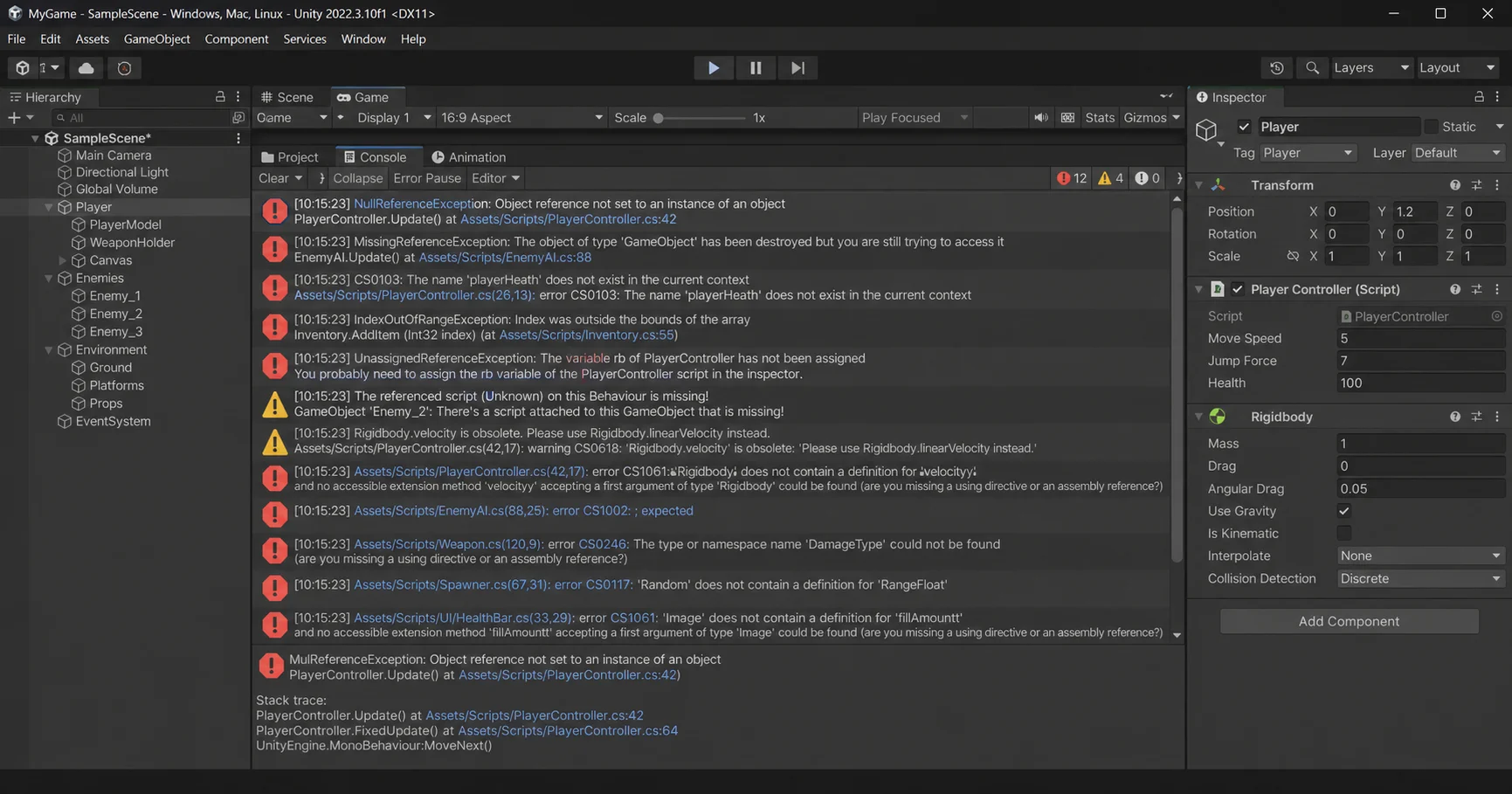
AI has only accelerated the problem. Errors are now something an LLM "deals with" on your behalf, and I genuinely worry that in a few years a generation of new Unity developers will barely know what an error log is. That is a scary place to be, because errors are not noise. They are the most direct feedback your code can give you about what it is actually doing.
The single biggest jump I made as a programmer happened the day I started taking errors seriously. I would read the message letter by letter, look at the stack trace, and ask myself why this specific thing happened in this specific spot. After a while I stopped seeing a wall of red text and started seeing a story about my own code, and that is when I actually started understanding what was going on under the hood.
The clearest example in Unity is NullReferenceException. Almost every beginner hits it, and almost none of them understand why. The error itself is telling you exactly what is wrong: your code tried to use a reference that points to nothing. The reason most beginners can't see that is they have never sat down with how references actually work in C#, so the message looks like a curse instead of a sentence. Read enough of those errors patiently and the pattern becomes obvious, and you stop being scared of red text in your console and start using it as a tool.
Learn to debug your own code
I learned this one the hard way. For longer than I want to admit, my workflow was simple. Make a change to the code, hit Play in Unity, see if it works. If it didn't, change something else and try again. I would spend hours, sometimes literally days, stuck in that loop, getting nowhere and slowly losing my mind. A single Debug.Log in the right spot would have solved most of those bugs in seconds, but I was not there yet. The day I finally saw the value of debugging was the day my speed as a programmer changed for good, and now debugging is the first tool I reach for, not the last.
This habit is even more important now that AI is in the loop. If you decide to let an LLM do your debugging for you, fine, but it will not suggest stepping through your code on its own. It will not place a log for you proactively, and it will not stop and say "by the way, are you sure that variable is what you think it is at this line". You still need to know how to debug, because debugging is what tells you whether the code, AI-written or yours, is actually doing what you believe it is doing.
I see the same pattern over and over with my students and with junior developers I tutor. They will confidently say "this is happening because of X" without any proof, and I stop them with the same two questions every time: how do you know, and are you sure? What I am really asking is "go add a log and confirm it", because more often than not, what they thought was happening is not what was actually happening. After a few rounds of that, they start adding the log on their own, and that small shift is what separates a beginner from someone who actually knows what their code is doing.
Treat debugging like a core skill, not a side technique. It is as important as learning C# syntax, algorithms, or data structures, and arguably more important than any of them, because debugging is the skill that turns everything else from theory into something you can verify. The Unity programmers I trust the most are the ones who never assume anything about their own code without checking it first.
Use Git from day one
If you are already learning programming and you decided that skipping Git was somehow the smart move, this one is for you. I had one project early on where the files corrupted, I had no version control, and I could not recover any of it. That is the moment Git stopped being optional for me, and I have not started a project without it since. Even a tiny prototype gets a repo on day one, because the cost is zero and the protection is everything. If you have not learned Git yet, the Pro Git book is the canonical free resource and the first thing I would point you at.
When you do learn Git, learn it in the terminal first. Skip the graphical clients until you actually understand what git add, git commit, git push, and git rebase are doing under the hood. I have watched developers at companies I worked at get visibly uncomfortable when I would do Git operations in a terminal, and a few of them tried to convince me that GUI clients were "different" or somehow safer. They were not. They were just describing how they were taught, and they had not moved past it. Once you actually know the commands, the GUI becomes a convenience, not a crutch. Tools like Unity Hub's native GitHub and GitLab integration are fine once you have the fundamentals, just not before.
There is a bigger pattern hiding underneath this one, and it is worth calling out. Game development is one of the most GUI-heavy disciplines in software, and most game devs start on Windows, where you can spend years building games and barely touch a terminal. Compare that to a backend developer on macOS or Linux who lives in the shell from day one, and you start to see why so many game programmers freeze the moment a problem leaves the comfort of an editor. I do not say this to insult anyone. I have worked with a lot of game devs, and most of them did not really understand their own operating system or file system, and that gap shows up in surprising places.
Symbolic links are a great example. When I would set up a symlink so a shared folder lived in two places at once, more than one teammate looked at it like it was magic. It is not magic. It is a feature that has existed in operating systems for decades, and it only feels like magic if you have never opened a terminal. The same is true for Unity logs. Every Unity developer eventually hits a problem where they need to read the Editor or Player log, and finding that log file feels like a quest, when in reality it is a plain text file sitting in a known folder on your machine. Get comfortable with your operating system, your file system, and your terminal, because Git is just the first place where a lack of those skills will show up.
Learn the Unity execution order by heart
Even experienced developers I have worked with have never opened the Unity script execution order page. It is sitting right there in the official Unity documentation, and it tells you exactly when every event method on a MonoBehaviour gets called. If you are serious about becoming a better Unity C# programmer, this page is something you should know almost by heart, not something you skim once and forget. I break down that lifecycle, and why the execution order trips up so many beginners, in 10 essential tips every Unity developer must know.
Most beginners assume the order of these methods is roughly "whatever feels intuitive". A common one I see is the belief that OnEnable runs after Start. It is actually the opposite. OnEnable runs much earlier in the initialization phase, right after Awake, while Start happens later, just before the first frame update. Get that one wrong and you will spend an hour chasing a bug that the documentation already explained on page one.
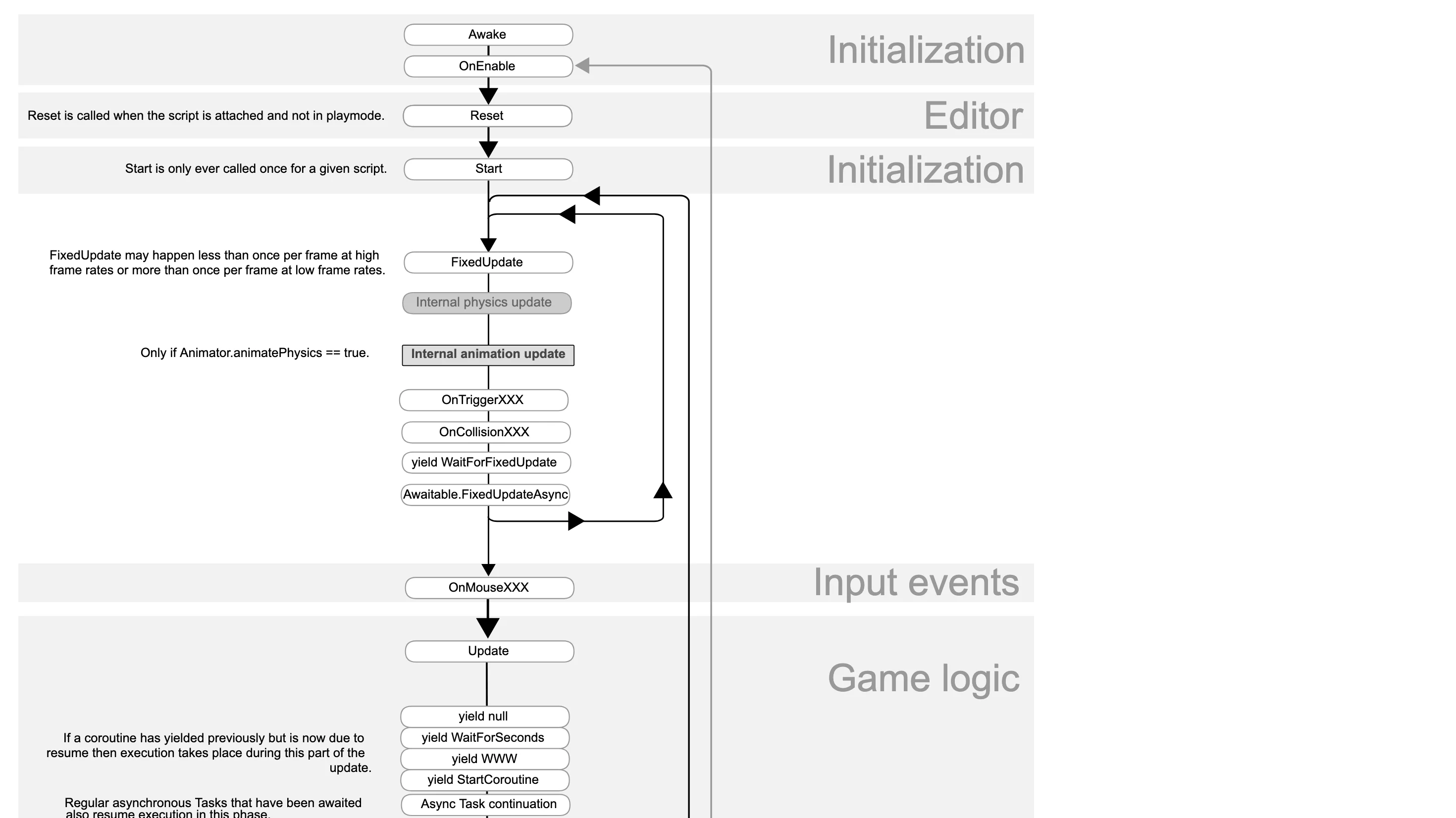
You should never have to guess where to put your initialization logic. Once you actually know the order, the placement decisions stop being guesswork. Heavy setup that does not depend on other objects goes in Awake. Wiring that should happen every time the object is enabled goes in OnEnable. References to other objects that need to exist already go in Start. Per-frame logic goes in Update, physics-driven logic goes in FixedUpdate. There is no magic to any of this once the lifecycle is in your head.
This is one of those tips that sounds boring on the surface, but it quietly removes an entire category of bugs from your career. Stop guessing where things should go. Read the page, study the diagram, and the next time someone on your team is debugging an "object not initialized" issue, you will already know where to look and what to ask.
Take a shower
Yes, you read that right, and no, this is not about hygiene, even though you should take care of that too. This one is about resting your brain. Every experienced developer has the same story, and I am no different. You spend an entire day fighting a bug, you cannot make any progress, you finally walk away from the keyboard, and somewhere between the shampoo and the towel, the answer drops into your head fully formed. It happens often enough that it stops being a coincidence.
The other version of the same trick is sleep. I have lost count of how many bugs I was hopelessly stuck on at 11 PM, gave up, went to bed, and had the fix ready in my head before my coffee the next morning. Your brain keeps working on the problem in the background, even when you are not consciously thinking about it, and that background process is doing real work. The keyboard is not the only place where programming happens, and once you accept that, you stop treating breaks as wasted time.
I want to be honest about how this maps onto 2026, because I do not entirely know yet. AI is genuinely good at keeping you moving forward, and a lot of bugs that used to require an overnight think now get unstuck inside a single chat session. That is amazing, but I am not convinced it replaces the slow background mode your brain runs while you are doing nothing. Before AI, walking away was how we solved hard bugs. The least you can do for yourself, even now, is try it the next time you are stuck and see whether your brain still has that gear. Mine still does.
