MonoBehaviour vs C# Class vs Struct: Memory and Performance

TL;DR: I measured the memory cost of a MonoBehaviour, a plain C# class, and a struct using the same Actor data. A single MonoBehaviour eats more RAM than a Nintendo NES once Unity attaches its engine baggage. I also benchmarked all three inside an update loop and broke down why the numbers shake out the way they do.
Most Unity tutorials teach you MonoBehaviour and stop there. Nobody explains what that script actually costs you in memory. A single Actor with a handful of fields takes up more RAM than a Nintendo NES. That is not because your data is heavy. It is because of what Unity attaches to every MonoBehaviour.
In this article, I measure the memory footprint of a MonoBehaviour class, a plain C# class, and a struct. I also run a benchmark to compare how they perform in an update loop, and explain why the numbers look the way they do.
This is an intermediate to advanced article. You should know what a class, a struct, and a reference type are before reading.
MonoBehaviour: the standard Unity design
I am going to create this object, a scene GameObject that will represent a character or an actor in the scene.
public class Actor : MonoBehaviour
{
    [Header("Identity")]
    public string actorName;
    public string actorTag;
    public string currentState = "Idle";

    [Header("Status Effects")]
    public bool isStunned;
    public bool isOnFire;
    public bool isFrozen;
    public bool isPoisoned;
    public bool isDead;

    [Header("Metrics")]
    public float currentHealth = 100f;
    public float maxHealth = 100f;
}
After I create the Actor class, I will attach this script to a GameObject in the scene and populate the data. In order for us to create this GameObject from code, I will turn it into a prefab first.
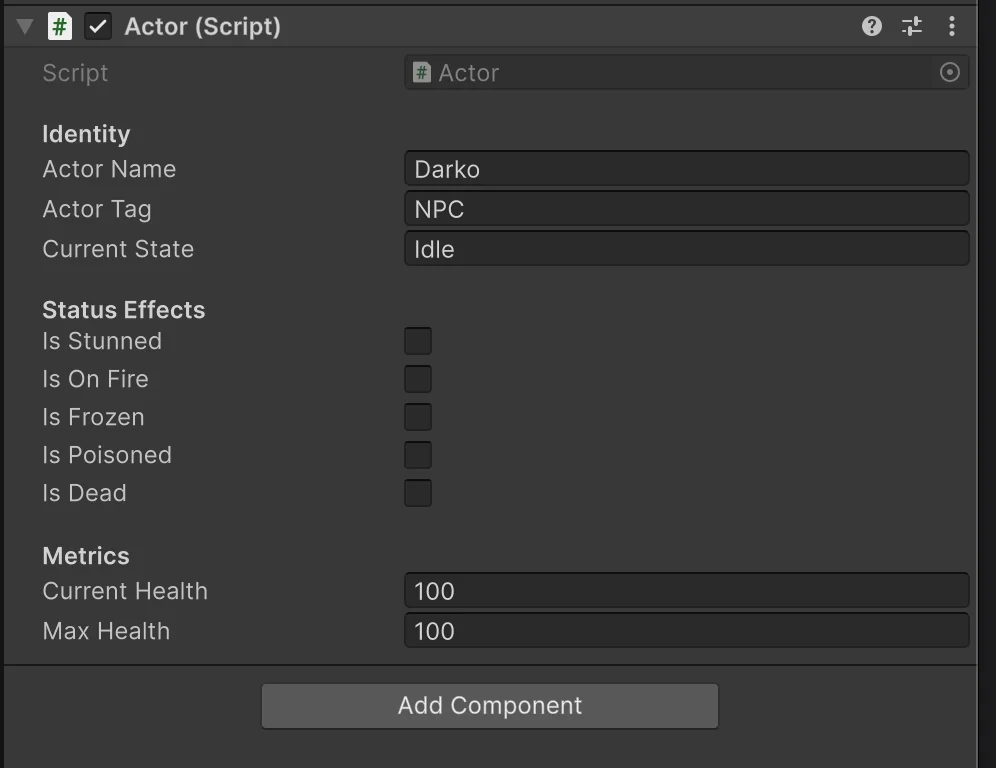
Then I am going to instantiate it in the scene using an old input system. The reason I use the old input system for this is that it is just better for quick prototyping. If you are interested in a new input system, read this article Why You Should Switch to the New Unity Input System
    private void Update()
    {
        if (Input.GetKeyDown(KeyCode.Space))
        {
            Actor actor = Instantiate(_actor);
        }
    }
The thing I am doing right now looks too simple. This is how most beginners create new game objects, and it is totally fine. The goal of this tutorial is to showcase the memory layout in C# and Unity. This article is not for complete beginners. It is for intermediate or advanced programmers. But even if you are a beginner, the article is simple to read, so you are more than welcome.
The GameObject Actor that we created is stored on the Heap, and in high-performance games, it can be an issue. And here is why. Let's investigate. I am going to measure the memory footprint of the object that we created on the heap. In the image we created, we can see what the game engine did. On the outside, it looks like a simple script, but under the hood, it is more than a script.
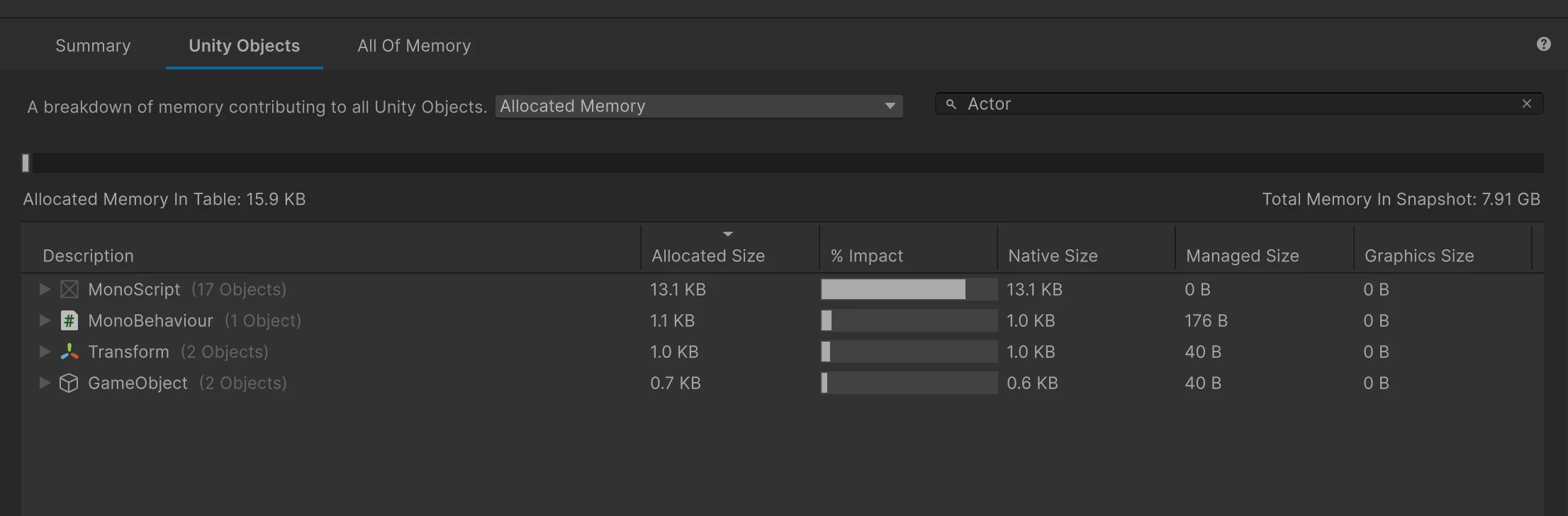
- MonoBehaviour 1.1 KB
- Transform 1.0 KB
- GameObject 0.7 KB
Total 2.8 KB in size.
To be honest, it's not a lot, but that is also why in my articles I often say "you are taking memory for granted". Let's compare it to an 8-Bit Nintendo Console. We created a single GameObject (Actor) in our game, and it consumed more memory than the Nintendo NES. The total memory of the NES was 2 KB. Here are the specs The Nintendo Entertainment System (NES) Specifications.
That is half the size of the Apollo Guidance Computer that helped astronauts land on the Moon in 1969. If you are interested in this space stuff, I made an article on Unity and NASA, and you can read more about it here NASA is using Unity Engine to render Artemis II mission. Once again, you are taking memory for granted. Neil Armstrong has been on the Moon, and he has taken fewer pictures than you and your buddies going to a nightclub.
In the next step, I am going to create 1000 Actors, and let's compare the memory footprint.
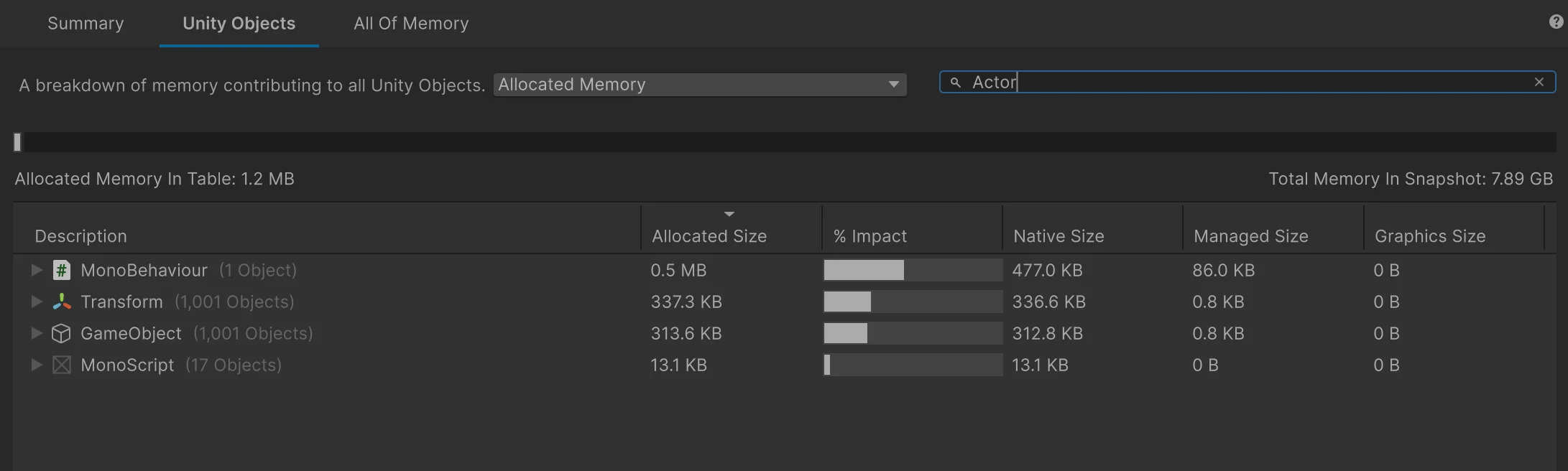
- MonoBehaviour 0.5 MB
- Transform 337.3 KB
- GameObject 313.6 KB
Total size: 1.14 MB
The Original Macintosh (1984) had 128 KB of RAM, but your 1000 GameObjects are over 1 MB. 9 times more. Yes, I know it is not a fair comparison but I just want to compare it to something for a reference. The Original Macintosh, at its release, was a complete revolution in computers. It was capable of running a full graphical interface, a word processor, a paint program, and doing it all within those 128 KB. While your GameObjects exist only to waste electricity for no reason.
This happens because Unity is not creating just your data class. Each Actor becomes a full GameObject with a Transform and a MonoBehaviour component, plus the managed and native objects that keep everything in sync. Your few fields are only a small part of the total cost. Most of the memory comes from Unity’s object model itself.
Unity's GameObject MonoBehaviour overhead
What if we could improve the memory footprint, and how would we do it? There are many ways to do this, and we will try some options. The first one that comes to my mind is to remove Unity's overhead or MonoBehaviour dependency.
So we just write it like this:
public class Actor
{
    [Header("Identity")]
    public string actorName;
    public string actorTag;
    public string currentState = "Idle";

    [Header("Status Effects")]
    public bool isStunned;
    public bool isOnFire;
    public bool isFrozen;
    public bool isPoisoned;
    public bool isDead;

    [Header("Metrics")]
    public float currentHealth = 100f;
    public float maxHealth = 100f;
}
In the example above, I removed MonoBehaviour because it carries the overhead of Unity components. Of course, this removes the option to instantiate this object in the scene. And that is fine, because we are not building a real project here. In a real situation what you would do is inject this into a real MonoBehaviour GameObject. This is not going to solve our problem, but it will change the memory layout, and that is what we are going after.
I will repeat myself just once more. The goal here is not to build a really useful project. The goal is to explain memory in the Unity game engine.
Now I am going to do the same thing I did in previous examples and I am going to compare memory.
if (Input.GetKeyDown(KeyCode.T))
{
    for (int i = 0; i < 1000; i++)
    {
         _actors[i] = new Actor
         {
            actorName = "Darko " + i,
            actorTag = "NPC " + i,
            currentState = "Idle " + i
        };
    }
    Debug.Log("T Key called");
}
In this example, I had to use the new keyword, which is not something that Unity beginners learn or understand, and it is just how Unity is. But at some point, they just learn it. Some of you will disagree with me, but trust me, I work with students, and I know what I am talking about. Unity forces this MonoBehaviour component-based architecture, and some people just fail to learn Constructors and the new keyword. I am not even blaming Unity. It is just how it is. Nobody expected this to happen. There is just this generation of Unity developers who only have experience in Unity. They don't have a background in other programming languages and ecosystems like the early Unity generation.
Let's analyze the new profiler run. They are slightly different, because when we use the new keyword, the memory is generated by and managed by C#. While the example before was managed natively in Unity. So, how we approach them in the memory profiler is different.

This time, I did not need to run 1 Actor object because I could just run 1000 and get the value of a single one. Here are the new results.
- Managed size: 56 B per Actor
- Managed impact: ~164 B per Actor
- Total managed size (objects only): ~55 KB
- Total managed memory (including data): ~85 KB
There is no Transform or MonoBehaviour anymore in these results because we removed Unity's MonoBehaviour overhead. If you look closely, the memory footprint has improved. Now let's compare the final result between MonoBehaviour actors and Non-MonoBehaviour actors.
MonoBehaviour class vs C# Class
| Metric | MonoBehaviour Actor | Plain Actor |
|---|---|---|
| Type | Unity object | C# object |
| Created with | Instantiate | new |
| Memory location | Native + Managed | Managed only |
| Per object | ~2.8 KB | 56 B |
| Per object (with data) | ~2.8 KB | ~164 B |
| 1000 objects | ~1.14 MB | ~55 KB |
| 1000 objects (with data) | ~1.14 MB | ~85 KB |
I hope this comparison table is clean enough. Even though we made some improvements, we still can't fit our Actors into an NES console or an Apollo Computer. On the positive note, it does fit into the Apple computer. Apple, are you hiring? I am open to work.
How about C# Structs, and do they improve performance?
Now, let's do the same with Structs and let's see if there is a noticeable difference. This is the path where Unity is heading. They are trying to influence this data-oriented design approach to Unity programming. You've probably heard about DOTS and ECS. I have a tutorial on it. These are the most up to date Tutorials on DOTS, and they are really worth reading about. Check it here:
- What is Unity DOTS? Is Unity DOTS worth learning in 2026?.
- Getting started with Unity 6 DOTS and ECS in 2026.
Though what we are going to do here is not DOTS, it can help you understand DOTS easier. Also, I am not going to explain what Structs are, because this is an intermediate+ tutorial and you should know it by now. In short, Structs are value types while classes are reference types. A local struct variable can live on the stack, but once you put structs into an array or a class field, they live on the managed heap, just like classes. The difference is layout. In an array, structs sit inline, one after another in a single contiguous block. Classes sit behind references, so the array holds pointers and each object is scattered somewhere else on the heap. That contiguous layout is where the real performance benefit comes from, not stack vs heap.
The code below is a new data design for Actor. We just changed the class to a struct. And now, as said above, this becomes a value type. When stored in an array, the data sits inline in one contiguous allocation, which makes it faster to iterate.
public struct Actor
{
    // Identity
    public string actorName;
    public string actorTag;
    public string currentState;

    // Status Effects
    public bool isStunned;
    public bool isOnFire;
    public bool isFrozen;
    public bool isPoisoned;
    public bool isDead;

    // Metrics
    public float currentHealth;
    public float maxHealth;
}
The code below is just gonna create 1000s of structs on a button press.
       if (Input.GetKeyDown(KeyCode.R))
        {
            for (int i = 0; i < 1000; i++)
            {
                _actors[i] = new Actor
                {
                    actorName = "Darko " + i,
                    actorTag = "NPC " + i,
                    currentState = "Idle " + i,
                    currentHealth = 100f,
                    maxHealth = 100f,
                    isStunned = false,
                    isOnFire = false,
                    isFrozen = false,
                    isPoisoned = false,
                    isDead = false
                };
            }

            Debug.Log("R key called");
        }
Now, let's see the results of this.

- Struct array size (1000 items): ~39 KB
- Total managed memory (including strings): ~144 KB
- Allocations: 1 (array only)
MonoBehaviour vs Class vs Struct
| Metric | MonoBehaviour Actor | Plain Actor (class) | Actor (struct) |
|---|---|---|---|
| Type | Unity object | C# object | Value type |
| Created with | Instantiate | new | new |
| Memory location | Native + Managed | Managed only | Managed (inline in array) |
| Allocation count | 1000 objects | 1000 objects | 1 array |
| Per object | ~2.8 KB | 56 B | inline (no separate object) |
| Per object (with data) | ~2.8 KB | ~164 B | inline (data in array) |
| 1000 objects | ~1.14 MB | ~55 KB | ~39 KB |
| 1000 objects (with data) | ~1.14 MB | ~85 KB | ~144 KB |
The struct version appeared to use more memory, but this was not due to the struct itself. In the test, each struct instance created unique strings ("Darko 1", "Darko 2", etc.), while the class version reused identical string values. This resulted in thousands of additional string allocations, which dominated memory usage.
- Memory is often dominated by data, not structure
- Structs don’t magically reduce memory
- Allocation patterns matter more than type
Structs are not faster because they are smaller. They are faster because they keep data close together in memory.
If we remove strings, the total memory drops significantly. Strings dominate the cost in this example. The same optimization can be applied to classes as well, so the difference is not in the data itself, but in how that data is stored. Classes still create many separate objects, while structs pack the same data into a single contiguous block.
Class vs Struct vs Struct with ref
At this point, memory is only part of the story. The next question is how these data types behave when we actually process them. All three tests below do the same amount of work. They allocate the same number of actors and run the same update loop. From an algorithm point of view, nothing changes. All three are still O(n).
What changes is how the data is stored and passed around. Classes are reference types, structs are value types, and ref lets us pass a struct by reference instead of copying it during method calls. That makes this a good way to isolate what is really affecting performance.
Benchmark Class
using UnityEngine;
using System.Diagnostics;

public class BenchmarkClass : MonoBehaviour
{
    [SerializeField] private int count = 1_000_000;
    [SerializeField] private int iterations = 50;

    private ActorClass[] _actors;

    private void Start()
    {
        _actors = new ActorClass[count];

        for (int i = 0; i < count; i++)
        {
            _actors[i] = new ActorClass
            {
                actorName = "Darko " + i,
                actorTag = "NPC " + i,
                currentState = "Idle " + i,
                currentHealth = 100f,
                maxHealth = 100f,
                isStunned = false,
                isOnFire = false,
                isFrozen = false,
                isPoisoned = false,
                isDead = false
            };
        }

        var sw = new Stopwatch();
        sw.Start();

        for (int j = 0; j < iterations; j++)
        {
            for (int i = 0; i < _actors.Length; i++)
            {
                UpdateActor(_actors[i]);
            }
        }

        sw.Stop();
        Debug.Log($"Class: {sw.ElapsedMilliseconds} ms");
    }

    private void UpdateActor(ActorClass actor)
    {
        actor.currentHealth += 1f;
        actor.maxHealth -= 0.1f;
    }

    public class ActorClass
    {
        public string actorName;
        public string actorTag;
        public string currentState;
        public bool isStunned;
        public bool isOnFire;
        public bool isFrozen;
        public bool isPoisoned;
        public bool isDead;
        public float currentHealth;
        public float maxHealth;
    }
}
Benchmark struct
using UnityEngine;
using System.Diagnostics;

public class BenchmarkStruct : MonoBehaviour
{
    [SerializeField] private int count = 1_000_000;
    [SerializeField] private int iterations = 50;

    private ActorStruct[] _actors;

    private void Start()
    {
        _actors = new ActorStruct[count];

        for (int i = 0; i < count; i++)
        {
            _actors[i] = new ActorStruct
            {
                actorName = "Darko " + i,
                actorTag = "NPC " + i,
                currentState = "Idle " + i,
                currentHealth = 100f,
                maxHealth = 100f,
                isStunned = false,
                isOnFire = false,
                isFrozen = false,
                isPoisoned = false,
                isDead = false
            };
        }

        var sw = new Stopwatch();
        sw.Start();

        for (int j = 0; j < iterations; j++)
        {
            for (int i = 0; i < _actors.Length; i++)
            {
                UpdateActor(_actors[i]);
            }
        }

        sw.Stop();
        Debug.Log($"Struct: {sw.ElapsedMilliseconds} ms");
    }

    private void UpdateActor(ActorStruct actor)
    {
        actor.currentHealth += 1f;
        actor.maxHealth -= 0.1f;
    }

    public struct ActorStruct
    {
        public string actorName;
        public string actorTag;
        public string currentState;
        public bool isStunned;
        public bool isOnFire;
        public bool isFrozen;
        public bool isPoisoned;
        public bool isDead;
        public float currentHealth;
        public float maxHealth;
    }
}
Before we look at the numbers, there is something important about this benchmark. In UpdateActor(ActorStruct actor), the struct is passed by value. That means the method receives a copy, modifies the copy, and the original entry in _actors is never written to. The class version passes a reference, so those writes land on the real heap object. The two loops are not doing exactly the same work. The struct version skips the write-back, which makes it faster for a reason that has nothing to do with cache locality.
I left this version in on purpose because it is a mistake I see in real code. Passing a large struct by value is a common bug, and this is what it looks like in a profiler. But to get a fair comparison, you need to pass the struct by ref. I show that version below.
| Test | Class (ms) | Struct by value (ms) | Speedup |
|---|---|---|---|
| Update Loop | 376 | 216 | 1.74× |
The 1.74x number is real, but it is not an apples-to-apples comparison because the struct version does less work.
Benchmark Struct with ref
To make the comparison fair, pass the struct by reference so the method writes back to the array, same as the class version.
for (int i = 0; i < _actors.Length; i++)
{
    UpdateActor(ref _actors[i]);
}

private void UpdateActor(ref ActorStruct actor)
{
    actor.currentHealth += 1f;
    actor.maxHealth -= 0.1f;
}
Now both versions allocate the same data, iterate the same count, and write the same fields. The only difference is memory layout. The struct array keeps data contiguous, so the CPU cache can prefetch the next element while processing the current one. The class array holds references, so every iteration chases a pointer to a different heap location.
That cache locality advantage is the real reason structs perform better in tight loops over large collections, not stack allocation, not skipping writes.
Next read: Most Unity devs still don't understand events or Is It Worth Learning Unity in 2026?
