Unity Events: Why Most Devs Still Get Them Wrong
TL;DR
Most Unity devs get C# events wrong in the same handful of ways: they reach for UnityEvent when Action is cleaner, forget the
eventkeyword, wipe out subscribers with=instead of+=, and skip unsubscribing inOnDisable. This article walks through delegates, Action, theeventkeyword, UnityEvent, and the subscribe/unsubscribe pattern, using real code from a Unity game I shipped. By the end, you will know which tool to reach for, when, and why.
The reason most beginners don't understand events is not because they are difficult, it is because they can't find a reason to use them. Another reason is that complete beginners try to use them, which is wrong. If you are completely new to programming, skip events until you feel you need them. If you are building small games, you will be fine without them. Even in larger games, you'd do just fine. To be honest, you can build entire games without using them, but should you? They are a defining feature of C# and worth learning, the same way interfaces are a feature most Unity devs skip until they finally need one. Many guides and tutorials fail to explain them because they never explain the intent. In this tutorial, you will finally understand them.
Table of contents
- Why can't you understand Unity events?
- How many kinds of events does Unity have?
- The easiest way to understand events
- What are C# Delegates and what is their use case in Unity?
- What is C# Action and when should you use it in Unity?
- What is the C# event keyword and when do you use it in Unity?
- What is UnityEvent and how is it different from C# Action?
- Action vs UnityEvent vs delegate: which one should you use in Unity?
- When should you use += and = with C# events in Unity?
- Why do you use ?.Invoke() instead of just Invoke() in Unity events?
- How do you use C# events in a real Unity project?
- Why you should always subscribe in OnEnable and unsubscribe in OnDisable
- When C# events go wrong: callback hell explained
- What callback hell actually is
- The mistakes to stop making today
- Final thoughts
Why can't you understand Unity events?
There are many ways new developers discover events: through YouTube, Udemy courses, forums, or Reddit. Everywhere they look, events are shoved at them as something they must learn. They try, and they fail. Now they are forced to learn it for the sake of learning it. It is the same in school. They give you a topic to learn but you never understand why you are learning it, and even when you learn it you forget easily.
If they watch tutorials on it, they still fail. What I noticed in most tutorials is that they copy the intro section on events from Wikipedia or C# docs or some other technical website, and they just read it out loud. And now here comes the problem: if an experienced dev watches the tutorial, he will understand because he already knows the topic. But if a beginner watches it and listens to a technical overview from a wiki page, they get even more confused. These technical sites are not written for beginners. They are not beginner material, they are references for professional developers. And so these tutorial makers will just recite whatever is on there and it will sound good. But if something sounds good, it doesn't mean you will learn it. I have a feeling that most tutorials are made to satisfy only experienced developers so they don't get judged. They are not made with beginners in mind.
The short answer: events are a scaling solution. In a small demo you don't need them. On one of my projects, my player character was coupled to the UI, the audio system, and the scene managers. The moment I wanted to reuse that character in a different scene, I had to drag all of those systems along with it, even the ones that scene did not need. My workaround was to hide or disable the systems that were not being used, but that only created a new problem. Every change meant remembering which systems were hidden where, and the maintenance turned into its own mess. That is the scaling problem events exist to solve. If you are pairing events with a broader architectural cleanup, also see how dependency injection decouples your Unity systems.
How many kinds of events does Unity have?
Short answer: three. Unity has delegates, Actions, and UnityEvents. All three get called "unity events" by most devs, even though delegates and Actions are pure C# and have nothing to do with Unity. I've seen this firsthand tutoring students, where the confusion is almost always about which one to reach for. We will cover each in the next sections, and then a fourth idea, the C# event keyword, which is not a separate type but a modifier that turns a delegate or Action into a proper event.
The easiest way to understand events
Events click the moment you stop treating them as their own thing and start treating them as a weird variable. Stay with me.
You know what a variable does. You name a piece of data, assign a value, and read it or pass it around from anywhere you have access to the variable. Primitives like int, float, or char go in there. So do non-primitives: a class instance, a struct, an enum.
// Primitives
int score = 100;
float speed = 5.5f;
char letter = 'A';

// Non-primitives
GameObject player = new GameObject();    // class
Vector3 position = new Vector3(0, 0, 0); // struct
KeyCode jumpKey = KeyCode.Space;         // enum
Now the shift. You can also store methods in a variable. Not in a regular one, but in a special one called an event. An event is a variable that holds methods. Other classes can put their methods into that variable, and when the variable is "called" all of the stored methods run.
using System;
using UnityEngine;

public class Player : MonoBehaviour {
    public event Action OnJump;

    void Update() {
        if (Input.GetKeyDown(KeyCode.Space)) {
            OnJump?.Invoke();   // calls every stored method
        }
    }
}

public class AudioManager : MonoBehaviour {
    public Player player;
    public AudioClip jumpSound;
    public AudioSource audioSource;

    void OnEnable()  { player.OnJump += PlayJumpSound; }   // store my method
    void OnDisable() { player.OnJump -= PlayJumpSound; }   // remove my method

    void PlayJumpSound() {
        audioSource.PlayOneShot(jumpSound);
    }
}
That is it. Player.OnJump is a variable. AudioManager puts its PlayJumpSound method into that variable. When Player calls OnJump, PlayJumpSound runs, even though Player has no idea AudioManager exists. Events are one of the C# features most Unity devs still don't use, and it is one of the main reasons their code ages badly.
What are C# Delegates and what is their use case in Unity?
In most tutorials they will tell you to use delegates, and specifically they will tell you to declare your own. At least that was my experience years ago when I tried to learn events. Declaring a custom delegate confused me even more, and I didn't use them for some time because they felt like too much ceremony for what I was trying to do. Why most tutorials still cover custom delegate declarations as the main path to events, I have no idea.
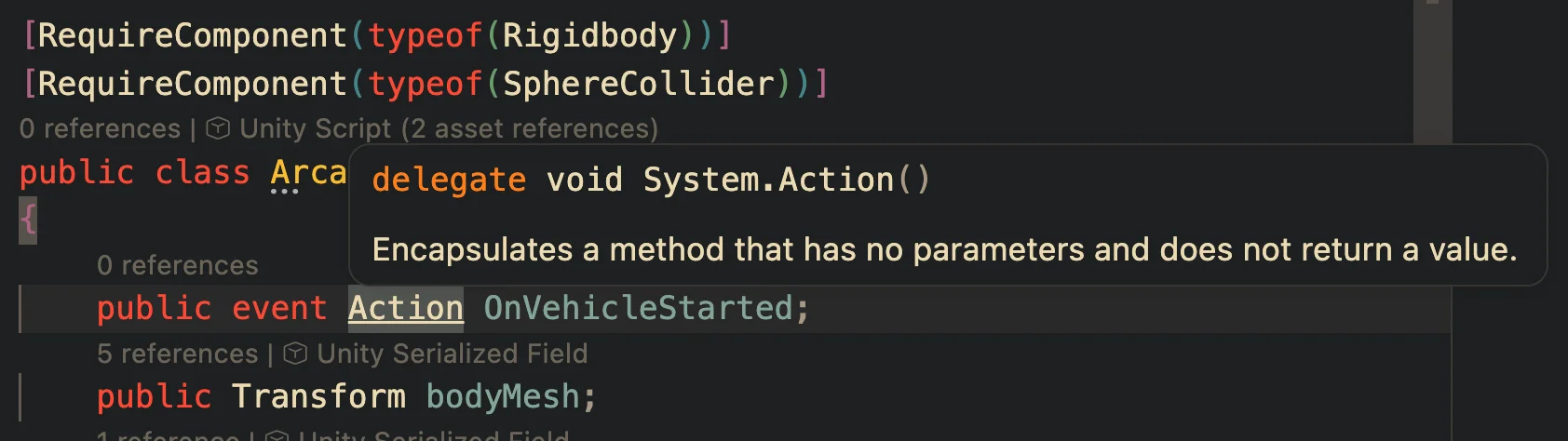
A delegate is the underlying mechanism, a type that holds methods, and everything else in C# events is built on top of it. Action, Func, and the event keyword are all delegates under the hood. When you hover Action in your editor, the tooltip literally says delegate void System.Action().
What most devs actually mean when they say "don't use delegates" is "don't declare your own custom delegate type." Here is what a custom delegate declaration looks like:
public delegate void JumpHandler();
public JumpHandler OnJump;
Notice the repetitive work. You declare a named type (JumpHandler) just so you can declare a field of that type (OnJump). Two lines to get one variable that holds methods. And if you want a different signature somewhere else, say one that takes a float, you declare another named type for it. This is exactly what Action removes in the next section: you skip the custom type declaration entirely and just write public Action OnJump;. Same delegate underneath, just one that .NET already declared for you.
What is C# Action and when should you use it in Unity?
Now that we have a better picture of what events are and what delegates are, the story continues. Developers got bored of typing the same thing twice. Declare a named delegate type, then declare a field of that type. It was repetitive. So C# introduced Action in .NET Framework 2.0 back in 2005, and later added the generic versions Action<T> and all the way up to Action<T1, T2, ..., T16> in .NET Framework 3.5 in 2007. The generic versions are what you will use the most today.
That is why Action exists, and that is why you should reach for it instead of a custom delegate declaration. You still get a delegate under the hood, just with less ceremony. When you write Action in your editor and hover over it with your mouse, the tooltip will tell you straight up: delegate void System.Action(). Action is a delegate. It is just a predefined one that the framework ships with, so you do not have to declare your own type every time you want a variable that holds methods.
Compare this to what we did in the delegates section:
// Delegate: two lines, you declare the type yourself
public delegate void JumpHandler();
public JumpHandler OnJump;

// Action: one line, the type is already there
public Action OnJump;
Same result, half the code, no custom type sitting around polluting your namespace. For anything that takes parameters, you use the generic overloads. Action<float> for a method that takes a float, Action<float, Vector3> for two parameters, and so on. No return value though. The moment you need the method to return something, you switch to Func<T>, but that is a separate rabbit hole and most Unity event flows do not need it.
What is the C# event keyword and when do you use it in Unity?
This is one of the most asked questions and very few can explain it properly. Students ask me this constantly. They see public event Action OnJump; in a tutorial, the tutorial moves on, and now the event word is just sitting there looking important but unexplained.
Short answer: yes, use it. Use it every time you declare an Action or a delegate that belongs to a class. Here is what it looks like:
public class Player : MonoBehaviour {
    public event Action OnJump;    // the event keyword goes in front of Action

    void Update() {
        if (Input.GetKeyDown(KeyCode.Space)) {
            OnJump?.Invoke();
        }
    }
}
Now let me elaborate on why. This is about writing defensive code. Think of it the same way you think about private versus public on a field, or readonly on a reference. You are telling the compiler "nobody outside this class should be able to mess with this." The event keyword does the same job for an Action. This is the same reasoning behind why you should stop using public fields in your Unity classes. The goal is always the same: own your data, narrow the surface area.
Two things change the moment you add event in front of your Action:
- No outsider can wipe your subscribers. Without
event, any other class can writeplayer.OnJump = null;orplayer.OnJump = SomethingElse;and erase every subscriber in one line. I have seen this kill UI listeners, audio listeners, and save systems, because one dev thought they were assigning a callback and they were actually overwriting the whole list. Withevent, the compiler rejects=from outside the class. The only operators outsiders get are+=and-=. - No outsider can raise your event. Without
event, any other class can writeplayer.OnJump?.Invoke()and pretend the player jumped, even when the player did not. Withevent, only the class that declaredOnJumpcan invoke it. That is the whole point of events. The owner class is the only one allowed to say "this happened." Everyone else just listens.
// With a plain Action (no event keyword):
player.OnJump = null;            // allowed, wipes every subscriber
player.OnJump = Something;       // allowed, replaces the whole list
player.OnJump?.Invoke();         // allowed, anyone can raise it

// With public event Action OnJump:
player.OnJump = null;            // compile error
player.OnJump = Something;       // compile error
player.OnJump?.Invoke();         // compile error, only Player can invoke
player.OnJump += MyMethod;       // allowed
player.OnJump -= MyMethod;       // allowed
That is the whole payoff. The event keyword takes an Action from "a public field anyone can mess with" to "a contract I own and broadcast." The class that declares the event is the only one that invokes it, and everyone else can only opt in or out.
If you skip the event keyword, you open the door to what I call event callback hell: random classes raising events they do not own, = assignments wiping listener lists, and nobody knowing where the signal is actually coming from. We will cover that mess in a later section.
What is UnityEvent and how is it different from C# Action?
Purpose wise, UnityEvent and C# Action do the exact same thing. They both hold a list of methods, they both let other classes subscribe and unsubscribe, and they both fire all the subscribed methods when you invoke them. The difference is not what they do. It is how they live and where they get wired up.
The headline difference: UnityEvent is exposed in the Unity Editor inspector. C# events are not. You have almost certainly used a UnityEvent already without thinking about it. Open any Button component in your scene and scroll to the bottom. That "On Click ()" slot is a UnityEvent:
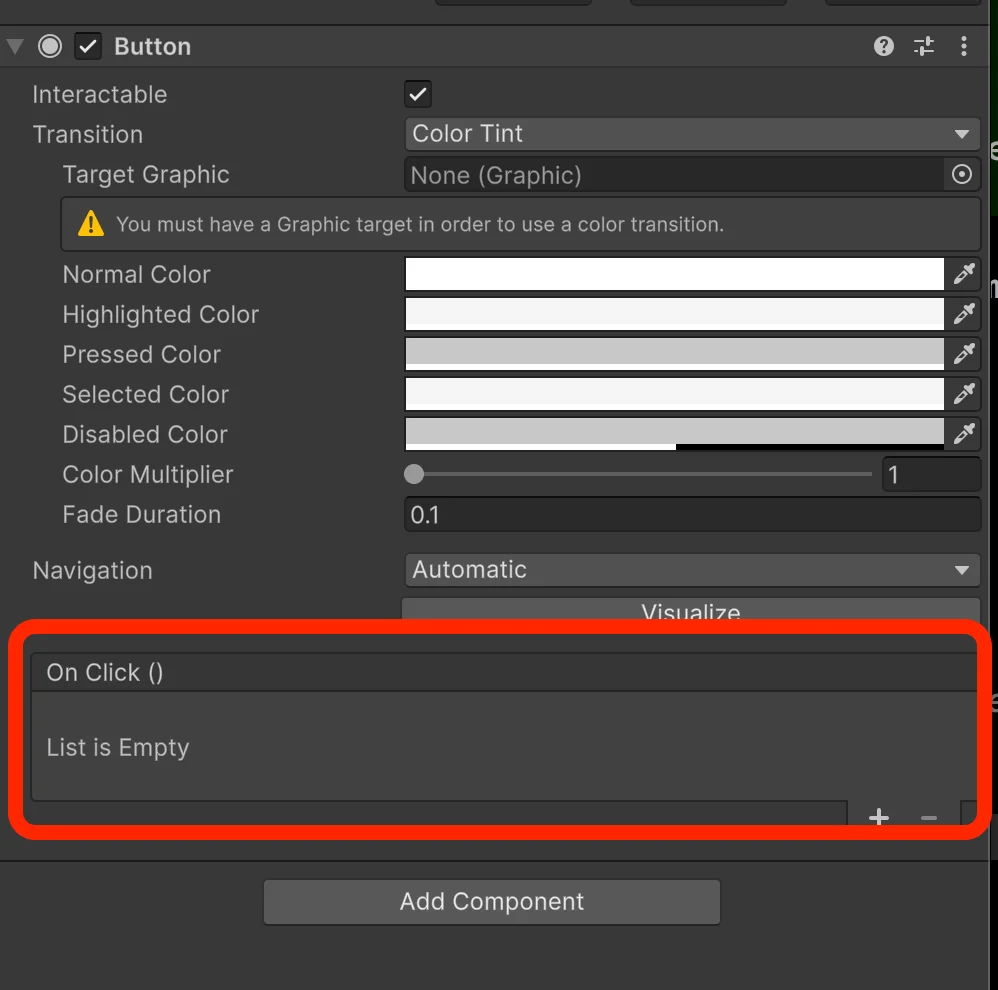
When you write a C# Action or a C# event, it lives in code. It is not serialized, it does not show up in the inspector, and non-coders on your team cannot drag-and-drop anything into it. If a designer wants the button to play a sound when clicked, they either ask you to wire it up in code or they wire a UnityEvent themselves. That is the one thing UnityEvent gives you that Action cannot.
So why would anyone pick Action over UnityEvent if UnityEvent is friendlier to non-coders? Because I personally use C# events 99% of the time, and there are real reasons for it.
Reason 1: C# events are visible in your code. When you open a class and see public event Action OnJump;, you know immediately that this class broadcasts a jump event. You can search for OnJump in the whole project and find every subscriber and every invocation. UnityEvent hides in the scene. You cannot grep for it, you cannot see it by reading code, you only see it if you click through the inspector.
Reason 2: version control. This is the one people almost never talk about but it bit me hard on real projects. When you change a C# event or the handler that subscribes to it, git shows a clean diff on the class file or the subscriber file. You can review it, you can blame it, you can revert it. When you change a UnityEvent in the inspector, git shows a diff on the scene or prefab file. Every other unrelated change in that scene is in the same diff, and the actual "I rewired this callback" change is buried in YAML serialization gibberish. Code review of UnityEvent changes is basically impossible.
Reason 3: performance. UnityEvent is slower than a C# event, and it is slower for real reasons. When you wire a method through the inspector, Unity serializes the target and the method name as strings in the scene file. At scene load, Unity uses reflection (Delegate.CreateDelegate) to find and bind those string-named methods into actual invokable delegates. Reflection is slow. The worst cost is paid at load time, but per-invoke there is also more overhead than a direct delegate call because UnityEvent walks its own call list. This usually does not matter for a button click once every few seconds. It matters a lot if you are firing UnityEvents from Update, from physics callbacks, or from inner gameplay loops. Unity is aware of this and is migrating the scripting runtime from Mono to CoreCLR over the course of 2026, with Unity 6.8 removing Mono entirely, which will shrink this gap. Until then, if performance matters, C# events win.
The one valid case for UnityEvent is when you have artists or non-coders on the project with you. A designer should not have to open your scripts to wire a sound to a button. Hand them a UnityEvent on the inspector and they can drag and drop their own method in. You do not expect them to write code. For that specific workflow, UnityEvent is the right tool.
Now the story. I once inherited a project from a guy who got fired for underperforming. Every single event in his codebase was a UnityEvent, and he placed them on GameObjects buried deep inside scene hierarchies. When something broke, I had no way to "find references" on the handler. I had to manually click through nested children in every scene to figure out what was wired where. That was the moment I fully committed to C# events as the default. A codebase where you cannot find your callbacks is a codebase you cannot reason about.
To be fair, there are workarounds. Rider has Unity integration that shows you which methods are referenced by UnityEvents in the inspector, flagged right next to the method declaration. I do not use Rider personally so I cannot confirm every detail, but the feature exists. There are VSCode extensions that claim to do something similar, and modern AI-assisted IDEs can help you trace inspector references too. Still, none of that changes the fundamental problem: UnityEvent lives in data, not code, and data does not want to be reasoned about the way code does.
Action vs UnityEvent vs delegate: which one should you use in Unity?
After building Unity projects for over a decade, my rule is simple: default to C# Action, pay attention when UnityEvent is the right tool, and ignore raw delegates unless you have a very specific reason.
Here is the short version you can screenshot and tape to your monitor:
- C# Action → Default choice. Use for any code-driven event: gameplay systems, player state, save system, audio, analytics. Skip only when designers need to wire it in the inspector.
- UnityEvent → Use when non-coders on the team (designers, artists) need drag-and-drop handlers. Common on UI buttons, animation events, tutorial triggers. Avoid in hot paths like
Updateor physics callbacks, and anywhere you care about clean version control. - Custom delegate type → Rarely. Only when a reused event signature deserves its own name for clarity.
ActionandAction<T>cover 99% of the cases most teams would otherwise write a custom delegate for.
Now the longer version.
C# Action is the default. This is where 99% of your events should live. It is one line to declare, the compiler knows about it, your IDE can find every subscriber and invocation, and git shows you a clean diff when anything changes. Combine it with the event keyword (as covered above) and you get defensive code for free. If you take one thing from this article, it is this: reach for public event Action OnX; first, and only switch to something else if you hit a real limitation.
UnityEvent is a team tool, not a programmer tool. The only time I willingly reach for a UnityEvent is when there is a non-coder on the project who needs to wire behaviour without opening a script. UI buttons are the canonical case. Animation events are another. If you are a solo developer or an all-programmer team, you do not need UnityEvent. The inspector-visible superpower is irrelevant when everyone on the team reads code.
Custom delegate declarations are rarely needed today. Action and Action<T> shipped in 2005 and 2007, and once they did, you stopped having to declare your own named delegate type every time. The only case I can think of where a custom delegate declaration still makes sense is when you want a strongly named type for an event signature you reuse in many places, and even then most teams just use Action and move on. If a tutorial in 2026 is teaching you to declare your own delegate type as the main path to events, it is teaching you outdated C#.
If you are still unsure: write a C# Action, mark it with event, subscribe in OnEnable, unsubscribe in OnDisable, and you are ahead of most Unity codebases I have ever inherited.
When should you use += and = with C# events in Unity?
So many beginners ask me about this, but it is simpler than it looks. The confusion is not really about events. It is that you probably skipped or rushed the basics of C# operators and what they actually do. Once you see it with plain integers, it becomes obvious and the event version just falls into place.
Here is the whole story in one line: += adds to an existing value, = overrides it. That is it. There is nothing more to learn. Let me show you with an integer first, because that is the cleanest way to see what is actually happening.
int a = 10;
a += 10;   // a is now 20 (added to existing value)
a = 10;    // a is now 10 (overwrote the value)
That is the entire mental model. += takes what is there and adds to it. = throws away what is there and replaces it.
Now apply the exact same logic to an Action. An Action is a variable. It holds a list of methods. When you write +=, you are adding a method to the existing list. When you write =, you are throwing the whole list away and replacing it with one method (or with null, which wipes it entirely).
public class Player : MonoBehaviour {
    public Action OnJump;

    void Start() {
        OnJump += PlaySound;    // list = [PlaySound]
        OnJump += FlashScreen;  // list = [PlaySound, FlashScreen]
        OnJump += UpdateUI;     // list = [PlaySound, FlashScreen, UpdateUI]

        OnJump = NewThing;      // list = [NewThing], the previous 3 are gone
        OnJump = null;          // list is empty
    }

    void PlaySound() { }
    void FlashScreen() { }
    void UpdateUI() { }
    void NewThing() { }
}
If you understood the integer example, you understand the Action example. Nothing changed. The operator does the same thing. Only the type of data being assigned is different (a number versus a list of methods).
This is also why the event keyword (covered earlier) is so important. The moment you mark your Action as public event Action OnJump;, the compiler refuses to let outside code use = on it at all. It forces them to use += and -=. That is the safety net: if a teammate accidentally writes player.OnJump = MyThing; from another class, the project will not even compile. You get a loud error instead of a silent bug that wiped every other subscriber.
Rule of thumb:
- Use
+=to subscribe. Always. - Use
-=to unsubscribe. Always, especially inOnDisable, to avoid memory leaks. - Use
=only inside the declaring class when you truly want to reset the list, and even then prefernullassignment for clarity:OnJump = null;.
Why do you use ?.Invoke() instead of just Invoke() in Unity events?
Same spirit as the previous section. This confuses beginners because tutorials never explain it. They just type ?. because every other tutorial did, and they move on. I am going to explain exactly why it is there.
The problem first. Sometimes in your code you want to fire an event, but no one has subscribed to it yet. If nothing is subscribed, the event is null, and calling .Invoke() on null throws a NullReferenceException and breaks your game.
To protect yourself, the old way was a simple null check before calling Invoke:
if (OnJumpEvent != null) {
    OnJumpEvent.Invoke();
}
That is it. If the event has zero subscribers, the null check fails and we skip the call. No exception, no crash. If it has one or more subscribers, we call Invoke and everyone who subscribed runs their method.
This pattern is perfectly fine. It still works today and you will see it in older codebases. The only complaint is that it is two lines of boilerplate for something this common. You end up writing the same if (X != null) X.Invoke(); pattern all over the project.
So C# devs added a shortcut in C# 6.0, released in 2015. They called it the null-conditional operator, but most people just call it "the question mark." It lets you write the exact same thing in one line:
OnJumpEvent?.Invoke();
That is all. This line does exactly what the if (OnJumpEvent != null) { OnJumpEvent.Invoke(); } block above did. Nothing more, nothing less. The ?. reads as "if the thing on the left is not null, continue; otherwise, skip the whole expression and return null."
Think of it as a shortcut and nothing else. Many tutorials fail to explain this. They just type ? because everyone else does, and often the person making the tutorial does not know why they are doing it either. But you do now.
How do you use C# events in a real Unity project?
Let me show you a real one. This is pulled straight from Skeletons AR, a shared-AR shooter I worked on. The game had multiple things that could take damage and die, and I did not want to copy-paste health logic into every enemy, every prop, every breakable thing. Events made it one class that every damageable entity in the game reuses.
Here is the full class, annotated line by line so you can see exactly what each piece is doing:
using System;
using TOMICZ.SkeletonsAR.Game.LevelingSystem;

namespace TOMICZ.SkeletonsAR.Game.CommonComponents
{
    // A plain C# class (not a MonoBehaviour). You compose it into any entity that can take damage.
    public class EntityHealth
    {
        // Three events. Outside code can subscribe with += and unsubscribe with -=, but cannot wipe them or fire them.
        public event Action OnEntityDeathEvent;           // fires once, when this entity dies
        public event Action<float> OnHealthChangedEvent;  // fires on every damage or heal, passes the new health value
        public event Action OnHealthRestoredEvent;        // fires when health is fully restored (respawn, revive)

        // Read-only access to internal state. Outside code can ask "how much health?" but cannot change it directly.
        public float CurrentHealth => _currentHealth;
        public float MaxHealth => _maxHealth;

        private float _currentHealth;
        private float _maxHealth;
        private bool _isDead;

        public EntityHealth(float maxHealth)
        {
            // Start every new entity at full health.
            _maxHealth = maxHealth;
            _currentHealth = maxHealth;
        }

        public void UpdateHealth(float healthAffector)
        {
            // Ignore hits on an already-dead entity so the death event never fires twice.
            if (_isDead) return;

            // Apply damage, clamped so health never goes below zero.
            _currentHealth = Math.Clamp(_currentHealth - healthAffector, 0, _maxHealth);

            // Broadcast the new health to every subscriber (UI bar, screen shake, analytics, damage numbers).
            OnHealthChangedEvent?.Invoke(_currentHealth);

            // If this hit killed the entity, broadcast death so anyone listening can react.
            if (!IsEntityAlive())
            {
                _isDead = true;
                OnEntityDeathEvent?.Invoke();
            }
        }

        public void AddHealth(float healthAffector)
        {
            // Heal the entity, clamped so health never exceeds max, and tell every subscriber that health changed.
            _currentHealth = Math.Clamp(_currentHealth + healthAffector, 0, _maxHealth);
            OnHealthChangedEvent?.Invoke(_currentHealth);
        }

        // Entity is alive as long as health is above zero.
        public bool IsEntityAlive() => _currentHealth > 0;

        public void Restore()
        {
            // Respawn or revive: refill to max, reset the dead flag, and let everyone know.
            _currentHealth = _maxHealth;
            _isDead = false;
            OnHealthRestoredEvent?.Invoke();
        }

        // Called at setup to define how much health this entity has.
        public void UpdateMaxHealth(float health) => _maxHealth = health;
    }
}
Now the payoff. EntityHealth does not know about the UI. It does not know about audio. It does not know about the leveling system. It does not know about the analytics service. It only knows its own health value and three events that announce what happened.
The UI health bar subscribes to OnHealthChangedEvent and redraws itself. The audio system subscribes to OnEntityDeathEvent and plays the death SFX. The leveling system subscribes to OnEntityDeathEvent and awards XP. The respawn system subscribes to OnHealthRestoredEvent and re-enables the mesh and collider. Every single one of those systems can be added, removed, swapped, or disabled without touching a single line of EntityHealth. That is the decoupling events give you.
And because I used public event Action instead of a plain public Action, no other class in the entire codebase can accidentally call OnEntityDeathEvent?.Invoke() on an entity they do not own, or wipe the subscriber list with = null. The compiler enforces it. This is the defensive code rule from earlier, applied in the wild.
If I wanted to reuse this class in a different game tomorrow, I could drop it in, write the new UI and audio systems, and wire them up through the same three events. No rewrites inside EntityHealth. That is what a real, production-grade event contract looks like.
You can literally copy and paste this class into your own Unity project right now and it will work. Change the namespace, wire up your own UI and audio as subscribers, and you have a reusable health component. That is the whole point of writing events this way. The class is self-contained, it announces what happened through three clean events, and any game that has something that can be damaged can use it as-is.
Why you should always subscribe in OnEnable and unsubscribe in OnDisable
If you have looked at any Unity code that uses events, you have seen this pattern:
void OnEnable()  { player.OnJump += PlayJumpSound; }
void OnDisable() { player.OnJump -= PlayJumpSound; }
That is the golden rule. Subscribe in OnEnable, unsubscribe in OnDisable. Every time. And most tutorials just show you the pattern and move on without explaining why. Let me explain why.
The real problem is not what most people think. When beginners first hear about unsubscribing, they think it is about memory leaks. Memory leaks are one reason, but they are not the reason that actually bites you in production. The reason that actually bites you is double-firing.
Here is what happens. Unity components can be enabled and disabled throughout a play session. A UI panel opens and closes. A pooled enemy is despawned and respawned. Every time the GameObject is disabled, Unity calls OnDisable. Every time it is re-enabled, Unity calls OnEnable. This is part of the MonoBehaviour lifecycle, which is worth understanding on its own because it is the reason these specific methods exist.
If OnEnable subscribes and OnDisable does nothing, guess what happens the second time the component enables:
void OnEnable() { player.OnJump += PlayJumpSound; }   // no matching OnDisable

// First enable:   subscribers = [PlayJumpSound]
// Disable:        subscribers = [PlayJumpSound]   (still there)
// Second enable:  subscribers = [PlayJumpSound, PlayJumpSound]
// Player jumps:   PlayJumpSound fires twice
Now your jump sound plays twice. Or three times. Or ten times after the panel has been opened and closed ten times. The object is still subscribed from every previous OnEnable, and nothing ever cleaned the list. This is the bug you will actually hit. It is silent, it is gradual, and the first time it happens you will spend an hour debugging the audio system before you realize your subscription list is a mile long.
Unsubscribing in OnDisable kills this class of bug instantly:
void OnEnable()  { player.OnJump += PlayJumpSound; }
void OnDisable() { player.OnJump -= PlayJumpSound; }

// First enable:   subscribers = [PlayJumpSound]
// Disable:        subscribers = []
// Second enable:  subscribers = [PlayJumpSound]
// Player jumps:   PlayJumpSound fires once. Always.
The second reason you unsubscribe is memory leaks. When a class subscribes to an event on another object, the event now holds a reference to the subscriber. If you destroy the subscriber but leave the subscription in place, the event still holds that reference. The garbage collector will not collect the subscriber because something is still pointing at it. Multiply that across hundreds of scene transitions and you have a leak that grows over a session and eventually makes the game stutter.
Is there ever a case where you can skip unsubscribing? Yes, technically. If a class lives for the entire session and never gets enabled, disabled, or destroyed, you can get away with subscribing once and never cleaning up. A manager singleton is the common example. It is created at boot, it lives until the application quits, and the GC will never care because the whole process is going away anyway. In that specific case, subscribing in Awake or Start without a matching unsubscribe is fine.
But the moment you step outside that narrow case, you are back to needing OnEnable and OnDisable. UI panels, pooled enemies, temporary effects, any component you put on a GameObject that could ever be enabled or disabled, all of them need the pair. So the rule I give my students is simple: default to OnEnable and OnDisable every time. Only skip it if you are 100% sure the class lives for the entire session.
When C# events go wrong: callback hell explained
I first heard about callback hell in developer dailies at a studio I worked at. My team talked about it often but we never really ran into it ourselves. Our codebase was small enough, and our events were focused enough, that we always knew who was listening to what.
Then I inherited a project from a .NET developer who had just moved into Unity. This dude read every Uncle Bob book and took every design pattern literally. Factories, observers, mediators, decorators, the codebase had all of them. His code was actually cool to read, because I like seeing different ways people solve problems. But maintaining it was a hell.
This was before AI. Making a small change took hours, because you had no idea who was referencing who. You had to open every file, trace every reference manually, and keep the whole graph in your head. Today you just paste a class into an AI tool and ask "where does this event start and where does it end, and add me this thing." It's not a big deal anymore. But back then, that inherited project taught me what callback hell actually feels like.
What callback hell actually is
Callback hell is when one event fires another event, which fires another event, which fires another one, until you cannot tell what triggered what. Each subscriber does its job and also invokes a new event inside its handler. A single action at the top of the chain ends up triggering ten different things down the line. On paper it looks clean, because every class has a single responsibility. In practice, changing one class breaks four others in ways you cannot predict.
Here is a small version of what it looks like in Unity:
public class Enemy {
    public event Action OnEnemyDied;

    public void Die() {
        OnEnemyDied?.Invoke();
    }
}

public class LootSpawner {
    public event Action OnLootSpawned;

    public LootSpawner(Enemy enemy) {
        enemy.OnEnemyDied += SpawnLoot;
    }

    private void SpawnLoot() {
        // spawn logic
        OnLootSpawned?.Invoke();
    }
}

public class Inventory {
    public event Action OnItemAdded;

    public Inventory(LootSpawner spawner) {
        spawner.OnLootSpawned += AddToInventory;
    }

    private void AddToInventory() {
        // inventory logic
        OnItemAdded?.Invoke();
    }
}

public class UIManager {
    public event Action OnUIRefreshed;

    public UIManager(Inventory inventory) {
        inventory.OnItemAdded += RefreshUI;
    }

    private void RefreshUI() {
        // UI refresh
        OnUIRefreshed?.Invoke();
    }
}

public class TutorialHints {
    public TutorialHints(UIManager ui) {
        ui.OnUIRefreshed += ShowHint;
    }

    private void ShowHint() {
        // tutorial popup
    }
}
One enemy dying triggers five classes in a chain. That is callback hell in miniature. Real projects do not look this clean, because each of these handlers would have three or four more events firing inside them, each with their own subscribers, each doing side effects you don't see until you run the game.
The fix is not to stop using events. The fix is to stop making your handlers fire new events unless there is a real reason for it. If a subscriber's job is to refresh the UI, it should refresh the UI and stop there. It is fine to have five direct subscribers on one event. That is simpler than building a chain of five events each with one subscriber, pretending the system is decoupled when it's really just hidden.
My golden rule is one, max two, subscribe layers deep. I don't know if this is a rule other developers follow, or if it has a name somewhere, but it is what I do. One layer means an event fires and subscribers handle it and that's the end. Two layers means a subscriber might fire one more event, and that one has its own subscribers that stop there. Anything beyond two layers and you are building the exact graph that took me hours to untangle in that inherited project. If you catch yourself going to three or four layers, the fix is almost never "add another event." It is "call the method directly" or "rethink who owns this logic." If you want to go deeper on how C# events actually work under the hood, Jon Skeet's delegates and events article is the cleanest explanation I have read.
The mistakes to stop making today
Most of the event bugs I see when juniors send me their code come down to the same handful of mistakes. Here is the short list:
- Public field without the
eventkeyword. Anything outside the class can wipe your subscribers or invoke the event itself. Addeventand the compiler locks both of those down. - Assigning with
=instead of+=. You just deleted every other subscriber on that event. Use+=to add and-=to remove. - Calling
Invoke()without?.. The first time nobody is subscribed, your game throws aNullReferenceException. Always?.Invoke(). - Reaching for UnityEvent in pure code. UnityEvent is for designer hooks in the inspector. If the wiring happens in C#, use
Action. You skip the reflection and the serialization overhead. - Subscribing in
StartorAwakewithout unsubscribing. Every re-enable adds another subscription, so your handler fires twice, then three times, then four times per trigger.OnEnableto subscribe,OnDisableto unsubscribe. That fixes the double firing and prevents the memory leak at the same time. - Firing events from inside handlers. One layer is clean, two layers is the limit. Anything beyond that and you are building the exact chain that will take the next developer hours to untangle.
Final thoughts
The title of this article says most Unity devs still don't understand events. If you read this far, you are not in that group anymore. The Unity code you write next week will age better than the code written by someone still wiring everything through UnityEvent in the inspector, and the next developer who inherits your project will actually be able to change something without spending three hours tracing references. If you are still early in your Unity journey, there are plenty of other traps waiting for you. I covered the worst of them in 10 mistakes I made learning Unity alone, so you do not have to repeat them.
That is the whole point.
