Game Development is AI-Proof: Unpopular Opinion

TL;DR
I have used AI heavily in Unity since 2022. It works for snippets but cannot build a real game. AI asset generation is not ready and advanced features like DOTS are out of reach. Vibe coders without programming fundamentals end up with broken or overengineered code. Game development is AI-proof because you still need to know what to prompt and how to verify the output.
I started using ChatGPT back in 2022 when GPT 3.5 launched, and for the past two years I have been using AI the way most developers use it in 2026. Not copy-pasting snippets out of a web chat, but running agentic tools directly inside the project where the AI has the full structure and real context. I started with Cursor, then switched to Claude Code. So when I say game development is AI-proof, I am not guessing. I have tried it all in Unity.
AI does work in Unity. But the productivity gains you get in web development with CRUD apps are not there in game development. In some cases it actively costs you time. Most developers will not admit this.
Why AI works so well for web development
Most web development work is simple. I know some of you reading this will protest, but let's be real. Most web apps are super simple. They are either a WordPress install or some flavor of React app. WordPress alone powers around 43% of all websites on the internet (W3Techs, May 2026). The rest mostly splits between Shopify, Wix, and JS framework apps like React, Vue, and Next.js. And almost all of them are doing the same thing under the hood, which is CRUD.
CRUD stands for Create, Read, Update, Delete. You have some data, you store it somewhere, and an end-user reads it back as output. That is it. That is most of what the web does. AI has trained on this principle for years, because everything we know about web development is out there in the open. The frameworks are open source and the patterns have been written about a thousand times on Stack Overflow. AI sat on top of decades of that.
Yes, I know there are complex web projects. The average project is not one of them. Most developers are building things somebody already built before, in a slightly different shape, for a slightly different audience. This is also why I do not think AI will replace us any time soon. Most vibe coders are building things that already exist and nobody needs.
Why doesn't AI work as well in Unity?
Technically AI does work in Unity. It is just nowhere near as efficient as it is in CRUD apps. You can call Unity games CRUD if you want. Under the hood there is data getting written and read like in any web app. But the comparison stops there. Games are beyond complex, and I mean that.
I tested my full AI-assisted Unity workflow in an earlier article called Unity AI Assistant review: not ready for real work, and the workflow itself does work. AI did what I asked it to do, snippet by snippet. But when I actually tried to build a real game with it, I could not. There are too many variables in Unity game development that AI cannot keep in context.
The most concrete example was a drivable car. Tripo, a generative 3D model tool, produced the car model just fine. But when Unity AI Assistant tried to set up the physics, it could not understand the relationship between the colliders and the model it had just generated. The colliders it produced were oversized. The car spun out of control and the gameplay was broken. Of course I can manually adjust the colliders and rigidbody. But that is exactly the problem. AI was supposed to save me time. Instead I would have been faster doing it manually from the start, because AI interacts with Unity through an MCP and some things are just quicker to do by hand.
Web development is mostly text and images. Games are more than that. They run on 3D models and real-time rendering. Input behaves nothing like a form submission, and output goes through a frame loop instead of a request-response cycle. To prompt AI well enough to handle any of this, you already need to know what to ask for. And to know what to ask for, you need to know common game patterns, programming fundamentals, and how Unity (or any other game engine) actually works.
AI asset generation is not ready
It has been four years since I used image generation for the first time. Does anyone remember Midjourney? I remember running prompts in a Discord server with a limit of around twenty images per day. Midjourney was my first real introduction to modern LLM AI.
In August 2022 I released a game trailer with a skeleton image generated in Midjourney. You can see it at the end of the video below. At the time, I thought we would not need artists anymore. So did everyone else. But even then I could see something was off. The skeleton did not follow the style of my game. It looked too realistic when the rest of the game was not.
Four years later, we still do not have AI that can replace artists. Any game that uses authentic art made by real artists will always look more original than a game generated with AI. Style is the thing the model cannot fake. It can produce something that looks impressive in isolation, but the moment you put it next to art a real human made for a specific game, the difference is obvious.
I went all in on this myself and built a game using only AI assets through Game Lab Studio. The game looks decent and the tool is genuinely impressive.
But I would always pick a real artist over AI if I had the budget. AI asset generation has its place, mostly in prototyping and concept art. It also comes with a hidden cost. If you generate your game with AI, Steam requires you to mark it as AI-generated. That tag can reduce sales because some players actively filter AI-generated games out of their feed. There is a commercial risk attached to shipping a game made entirely with AI assets.
When I posted about the AI-generated game on LinkedIn, the response was mostly negative. I wrote about that reaction and what it means for game developers in Addressing AI Use in Game Development.
You still need to learn programming
There is a new type of beginner in the AI era, what people now call vibe coders. They try to build games in Unity with zero understanding of the fundamentals. I have seen people writing gameplay mechanics without knowing the difference between Start() and Update(). They prompt their way to a moving character without realizing that one of those methods runs once at boot and the other runs every frame, and then they cannot understand why the input feels off.
When I look at the code AI generates for them, two things stand out. The first is that AI overengineers things that should be a single line. A simple field assignment becomes a property with a backing field, a getter, a setter, and a validator that nothing was ever going to trigger. The second is that AI brings .NET server-side habits into game code. It wraps Unity API calls in try/catch blocks where nothing can throw, because it has seen a million enterprise C# examples that needed exception handling and treats Unity the same way.
That second one is a bigger problem than it looks. An empty try/catch in a hot path costs you around 8x the time of the same code without it. And actually throwing an exception is around 84x slower than handling the same case without one (JacksonDunstan, Error Handling Performance). If AI wraps every line of your Update loop in try/catch and uses throw inside, you are paying for safety you do not need.
AI cannot do advanced Unity features like DOTS
DOTS is one of the things AI cannot do right now, and probably never will. Advanced Unity topics require deep understanding from the developer using them, and most Unity developers do not know how to use DOTS properly in the first place. If you want a primer on it, I have a full breakdown in What is Unity DOTS in 2026? Do You Actually Need It?.
Here is how I look at this. Open the calculator app on your computer and switch to the advanced view.
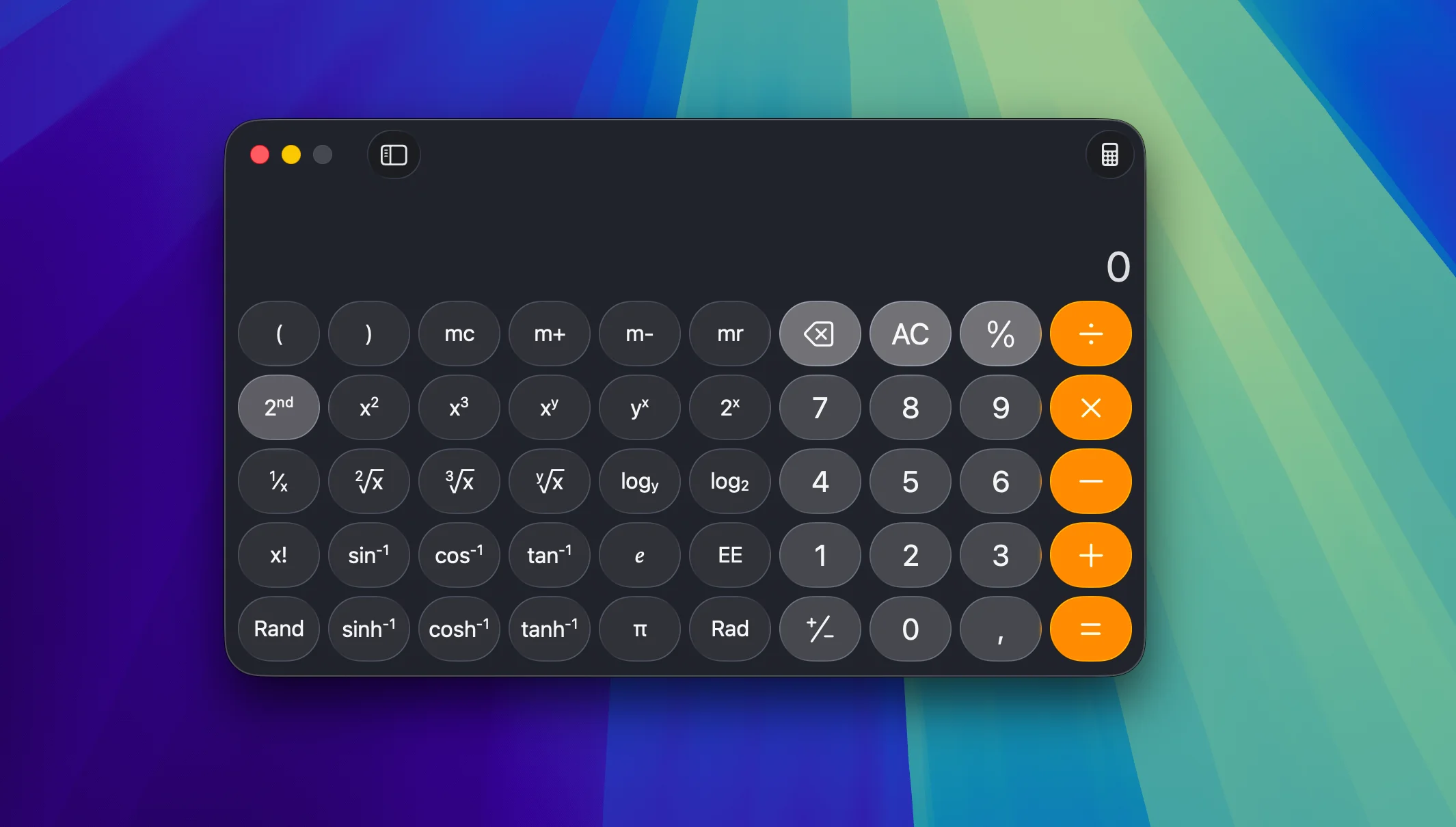
If you do not know any math beyond basic arithmetic, what input do you give it? You can press 2 + 2, but the moment you look at sin⁻¹, log, or factorial, you have no idea what they do or what number to feed them. The calculator can do more than you. That does not help you if you do not know what to ask it.
DOTS is the same. If you do not know what DOTS is, how it works, what problem it solves, and how it changes the way you write Unity code, you cannot know whether AI is giving you the right answer. You cannot phrase the question, and you cannot verify the output. The fact that AI can produce something that compiles is not the same as the code being correct or actually using DOTS the way it is supposed to be used.
Where AI actually helps in Unity
The moment AI clicked for me was the day I was wiring up subscribe and unsubscribe events across a bunch of scripts. My approach to Unity development is heavily event-based, something I went deep on in Unity Events: Why Most Devs Still Get Them Wrong. I use events in a slightly unhealthy amount, and that means a lot of repetitive event += handler and event -= handler boilerplate. I had been doing it by hand for years. Then I watched a YouTube video where another developer used AI to autocomplete the matching unsubscribe lines for a whole class in a few seconds. That was the moment I realized AI was actually powerful for Unity work, and I have been using it heavily ever since.
The other place AI saves me real time is editor tooling. Back in 2024 I worked at a company where most developers had not gone beyond ChatGPT in a browser. They did everything by hand, copy-pasting the same boilerplate for hours. With a small editor script and AI to scaffold it, I could do the same task in a fraction of the time. Anything repetitive that lives inside the Unity Editor is where AI compounds the fastest.
The clearest example is a Steam upload tool I built inside the Unity Editor. On another project I had to ship Windows and macOS builds for testing almost daily. Instead of dropping out to the Steamworks CLI or to SteamPipeGUI on Windows, I built an in-editor uploader with AI help. I wrote about it in SteamPipeGUI for macOS: Build and Upload to Steam Directly from Unity. I could hit a single button and have a Windows and macOS build on Steam in under a minute. That tool took an afternoon with AI. Uploading builds to both platforms by hand took me about an hour every time, and I was doing it daily.
